A warehouse management system implementation begins before anyone receives a login.
It begins when the business decides which inventory records can be trusted, how locations will be identified, who owns each warehouse decision, and what must happen when physical activity does not match the system.
Software configuration cannot answer those questions on its own.
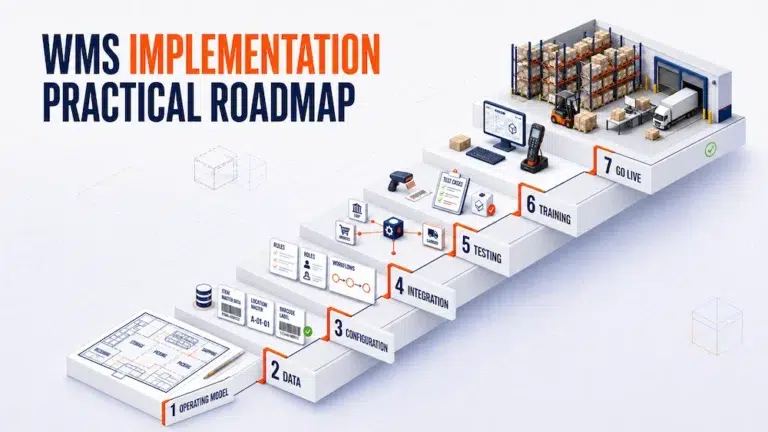
A practical warehouse management system implementation turns operating rules into data, workflows, permissions, integrations, and frontline actions. The project is ready to advance only when each of those elements has been tested well enough for the next stage to rely on it.
This roadmap uses readiness gates instead of a fixed calendar. The sequence matters more than an arbitrary launch date.
Treat Implementation as a Series of Readiness Gates
In a warehouse management system implementation, a project phase describes activity, while a readiness gate defines the evidence required before the project moves forward.
| Readiness gate | Question that must be answered | Required output | Reason to pause |
|---|---|---|---|
| 1. Operating model | What work will the WMS control? | Approved scope, process maps, owners, and success measures | Teams describe the same process differently |
| 2. Data | Can the system identify products, locations, inventory, users, and orders? | Clean data set with ownership and validation rules | Duplicate or incomplete records remain unresolved |
| 3. Solution design | How should normal work and exceptions move? | Configured workflows, statuses, permissions, and documents | The design covers only perfect transactions |
| 4. Integration | Which system creates and updates each record? | Field ownership, event rules, failure handling, and reconciliation | Two systems can overwrite the same information |
| 5. Validation | Does the complete workflow work with realistic data? | Passed test scenarios and resolved defects | Critical exceptions cannot be completed or investigated |
| 6. Operational adoption | Can each role perform its work without relying on the project team? | Role training, work instructions, and support ownership | Users know screens but not decisions |
| 7. Cutover | Can the operation move without losing control of inventory or orders? | Approved launch plan, opening balances, support coverage, and fallback criteria | Inventory, transactions, or responsibilities remain uncertain |
This makes the WMS rollout plan auditable. A calendar date does not prove readiness.
Define the Change Before Configuring the System
The project team should agree on what the implementation will and will not change.
Start with a short project charter that identifies:
- The warehouse locations included in the first release
- The inbound, storage, picking, packing, and shipping processes in scope
- The order channels, merchants, or clients affected
- The systems that will exchange data with the WMS
- The project owner and operational decision makers
- The measures that will indicate whether control has improved
- The workflows or facilities intentionally deferred
The measures should reflect the problems the project is meant to solve. Examples may include receipt discrepancies, inventory adjustments, location exceptions, pick corrections, packing holds, unresolved integration errors, and time spent reconstructing completed work.
The first release does not need to automate every decision. It needs to create a controlled core workflow that the operation can use consistently.
Map the Current Process and Design the Future State
Document how work actually moves today, including the workarounds that are absent from official procedures.
Follow real examples through:
- Receiving and discrepancy handling
- Product identification and inventory status
- Putaway and internal movements
- Replenishment and allocation
- Picking and shortage handling
- Packing and shipment preparation
- Shipping closure and record retention
For each transition, record the input, decision, owner, system, output, and exception path.
Then design the future state. Decide which steps will remain human decisions, which rules the system will enforce, and which events must update another platform.
Avoid copying the current process screen for screen. Some manual steps exist only because information is divided across files or teams.
The future state should be clear enough that configuration and testing teams interpret it in the same way.
Prepare Data Before Migration Becomes Urgent
Data preparation is one of the earliest WMS implementation steps, not a final task before launch.
The required data may include:
- Product names, SKUs, barcodes, units, dimensions, weights, and handling attributes
- Warehouse, zone, aisle, rack, shelf, bin, pallet, or floor locations
- Inventory quantities, statuses, owners, lots, serials, and expiry dates
- Merchant, customer, supplier, and carrier records
- Open receipts, transfers, orders, picks, shipments, and returns
- User accounts, roles, and permission levels
Assign an owner to each data domain. That person should decide how duplicates, missing values, obsolete records, and conflicting formats are resolved.
Rehearse the migration before cutover. Compare record counts, totals, ownership, location assignments, and sample transactions between the source and target. A successful import only proves that a file loaded. It does not prove that the warehouse can execute work from the resulting data.
Broader inventory policies may belong to an inventory management software process. The WMS project still needs accurate opening quantities, locations, statuses, and ownership so warehouse work begins from a reliable state.
Define Integration as an Operating Contract
An integration diagram should show more than arrows between systems.
For every shared record, define:
- Which system creates it
- Which system may edit it
- Which fields are required
- What event sends the update
- How duplicates are prevented
- How failures are detected
- Who resolves rejected or delayed transactions
- How the two systems are reconciled
For example, an ecommerce platform may create an order while the WMS controls warehouse status and the carrier returns shipment information. The project needs a clear rule for cancellations, address changes, partial fulfillment, duplicate messages, and updates received after picking has started.
When these connections are part of the project, review the documented It’s Here integration capabilities separately from the warehouse workflow. Integration has its own ownership and failure controls and should not be treated as a hidden checkbox inside the WMS configuration.
Configure the Foundation Before Specialized Workflows
Configuration should follow dependency order.
Begin with the records that every later workflow requires:
- Organization, warehouse, and merchant structure
- Product and inventory identity
- Warehouse and stock location hierarchy
- User roles and permissions
- Receiving and movement statuses
- Order allocation and picking rules
- Packing, shipping, and document requirements
- Exception ownership and history
The official warehouse fulfillment software page documents It’s Here capabilities including warehouse and stock location records, product details, receiving and shipping orders, multiple warehouses, multi merchant access, mobile barcode and QR scanning, picking and packing validation, and inventory updates.
During an It’s Here implementation, those capabilities should be configured against the approved future state and tested with the customer’s actual products, locations, roles, order sources, and exception rules. Their existence does not remove the need for process design or data preparation.
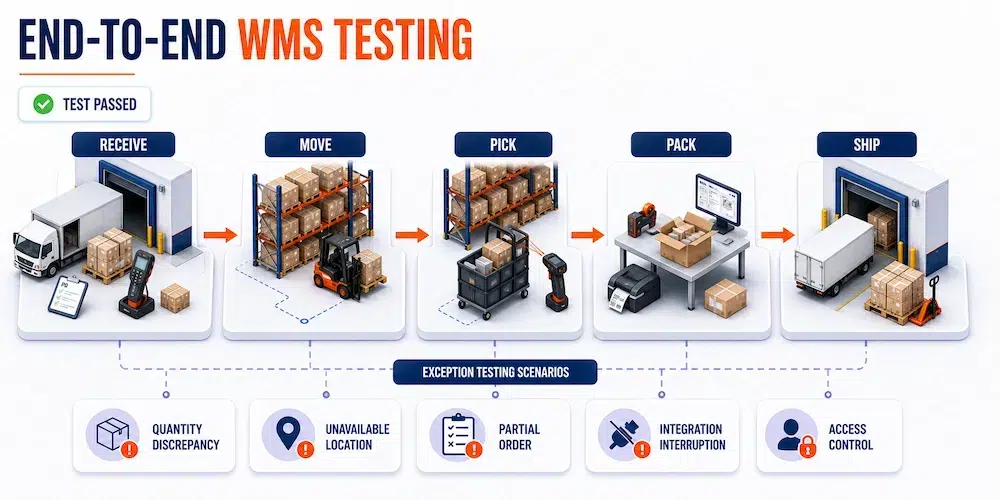
Test Complete Transactions, Not Isolated Buttons
Individual functions may work while the full process still fails at a handoff.
Create a test pack that follows transactions from their source through warehouse completion and connected systems.
| Test scenario | What the test should prove |
|---|---|
| Normal receipt to shipment | The standard flow updates inventory, locations, orders, and records consistently |
| Receipt discrepancy | Expected and actual quantities remain visible and usable stock is correct |
| Wrong or unavailable location | The worker can stop, report, and resolve the issue without inventing a workaround |
| Partial order | Allocation, picking, packing, and shipment status remain understandable |
| Changed or cancelled order | Updates are controlled after warehouse work has begun |
| Integration interruption | Failed transactions are visible, recoverable, and protected from duplication |
| User permission test | Each role can perform required work without accessing unauthorized actions |
| Shipment investigation | A completed shipment can be traced back through packing, picking, movement, and receipt records |
Use realistic products, barcodes, quantities, locations, users, and documents. Include both ordinary volume and a reasonable peak workload.
Record each defect with an owner, severity, resolution, and retest result. A verbal statement that the issue is “handled” is not sufficient evidence for the validation gate.
Train People Around Decisions and Exceptions
Training should be organized by role and task, not by a tour of every menu.
A receiver needs to know how to validate expected goods and record a discrepancy. A picker needs to know what to do when stock is missing. A supervisor needs to understand overrides, reassignment, and investigation. An administrator needs to manage access without weakening accountability.
Effective training includes:
- The normal workflow for each role
- The most likely exceptions
- Actions the user is authorized to perform
- Situations that require escalation
- The record created by each confirmation
- Where approved work instructions are stored
Use trained internal champions during rehearsals, but do not make them the only people capable of resolving routine questions. Support ownership should extend beyond the original project team.
Security must also be part of implementation. The NIST Cybersecurity Framework 2.0 Small Business Quick Start Guide provides practical guidance for identifying responsibilities, protecting access, detecting problems, responding to incidents, and recovering operations.
Select a Rollout Method That Matches Operational Risk
There is no universal cutover method for a warehouse management system implementation.
| Rollout method | Useful when | Main control requirement |
|---|---|---|
| Pilot workflow | One process or controlled order group can be isolated | Define what the pilot proves before expanding |
| Phased location rollout | Warehouses or operational areas can transition separately | Keep cross location inventory and order ownership clear |
| Phased client rollout | Merchant or customer activity can be separated | Prevent data and workflow rules from crossing accounts |
| Full site cutover | Parallel operation would create more inventory confusion | Complete data, testing, staffing, and fallback decisions before launch |
The cutover plan should identify the final transaction time in the old process, data extraction, migration, validation, opening inventory, release of new work, support coverage, communication channels, and criteria for stopping or continuing.
Stabilization Is Part of Warehouse Management System Implementation
Go live is the beginning of controlled observation.
During stabilization, review:
- Transactions waiting too long at each stage
- Inventory and location discrepancies
- Repeated overrides or workarounds
- Integration failures and duplicate messages
- User access problems
- Pick and pack exceptions
- Shipment records that cannot be reconstructed
- Support questions that indicate unclear training
Separate defects from design changes. A defect means the approved workflow does not operate as expected. A design change means the business has learned that the approved workflow needs revision. Mixing them can make priorities difficult to manage.
Schedule a post launch review after the operation has produced enough real transactions to reveal patterns. Compare results with the baseline, identify unresolved controls, and decide which improvements belong in the next release.
The Implementation Is Working When the New Process Becomes Normal
A successful warehouse management system implementation is not defined by activating every available feature.
It is defined by whether employees can receive, locate, move, pick, pack, ship, and investigate inventory through a process the business understands and controls.
Begin with the operating model. Prepare and govern the data. Define system ownership. Configure dependencies in the right order. Test complete transactions and realistic failures. Train each role around decisions. Move to cutover only when the readiness evidence is strong enough.
The project is stable when routine work no longer depends on the implementation team and exceptions produce clear records instead of private workarounds.
FAQ
What Is Warehouse Management System Implementation?
Warehouse management system implementation is the process of preparing data, configuring warehouse workflows, connecting required systems, testing operations, training users, moving to production, and stabilizing the new process.
What Should Be Completed Before WMS Configuration Begins?
The business should define project scope, process ownership, current workflows, future requirements, system boundaries, success measures, and the data required by the first release.
What Data Is Needed for a WMS Implementation?
Common data includes products, SKUs, barcodes, warehouse locations, inventory quantities and statuses, merchants, customers, open orders, shipments, users, roles, and connected system identifiers.
How Should a Warehouse Test a New WMS?
Test complete transactions using realistic products, locations, users, documents, and exceptions. Include shortages, wrong locations, partial orders, cancellations, integration failures, access restrictions, and shipment investigations.
Should a WMS Be Rolled Out All at Once?
Not always. A pilot, phased rollout, or full site cutover may be appropriate depending on whether inventory, orders, locations, and clients can be separated without creating conflicting records.