
The Inventory Management Software Built for Growth

The simple, powerful Small Business Inventory System that saves you time, prevents costly errors, and puts profit back into your pocket.

The Inventory Management Software Built for Growth

Real-Time Stock Tracking & Control
Always Know What's Here

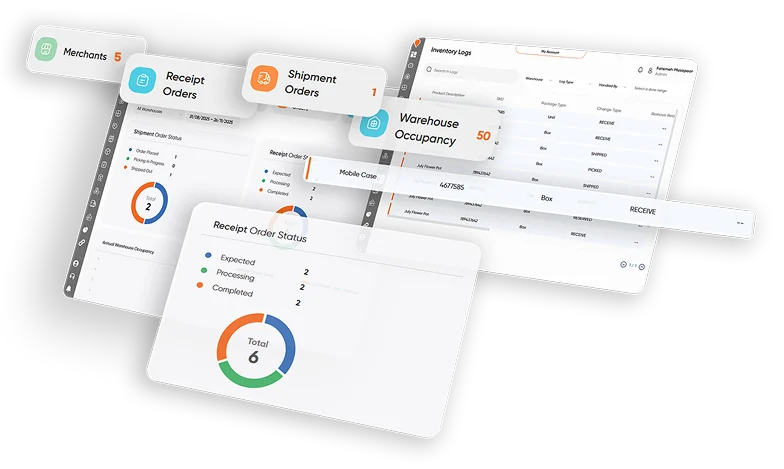
Gain complete visibility over every product, in every location, all from one intuitive dashboard. It’s Here provides the accuracy and speed you need to manage stock like a pro—whether you’re running a single store or a multi-warehouse operation that benefits from Warehouse Management Software to streamline storage, picking, and fulfillment processes.

Centralized Inventory View

Manage every SKU, kit, and product variation from a single, easy-to-read list. Use our powerful filtering and search to instantly locate stock, check product history, and manage multiple warehouses simultaneously.

Click Here

Never Miss a Beat with Automated Alerts 

Set custom reorder points and receive Automated Low Stock Alerts directly to your dashboard and email. Our system proactively flags critical stock levels, ensuring you can generate purchase orders before you run out of popular items.

Click Here

Seamless Stock Transfers

Quickly and accurately track inventory as it moves between locations (e.g., from warehouse to retail store). Generate transfer requests, confirm receipts, and maintain a verifiable audit trail for every single movement.

Click Here

Key Modules of Your Small Business Inventory System

1. Purchase Order Management Streamline Procurement from Request to Receipt

Create, send, and manage all your Purchase Orders (POs) directly within It'shere. Automatically convert Automated Low Stock Alerts into draft POs, track vendor lead times, and reconcile received goods against the order with a simple click. End-to-end purchasing control, built for efficiency.

2. Sales & Order Fulfillment Sync Inventory with Every Sale

Connect It'shere with your e-commerce platform and POS system. Instantly update Real-Time Stock Tracking with every sale to prevent overselling. Seamlessly generate pick lists, packing slips, and shipping labels directly from a confirmed order.

3. Reporting & Auditing Smart Reports for Smarter Decisions

Access powerful, customizable reports that go beyond simple stock counts. Analyze your best-selling products, identify dead stock, and forecast future demand using historical data. Every adjustment and movement is logged in a secure, exportable audit trail, ensuring 100% data integrity and ease of auditing.

4. Inventory Freezing Secure and Manage Your Stock

Take control of your inventory with it'shere Inventory Freezing feature, ensuring that specific stock is reserved and managed separately from standard operations. Frozen inventory cannot be used in shipment orders or reserved, providing you with precise control over your available stock.

Key Features and Functionality

Freezing Inventory

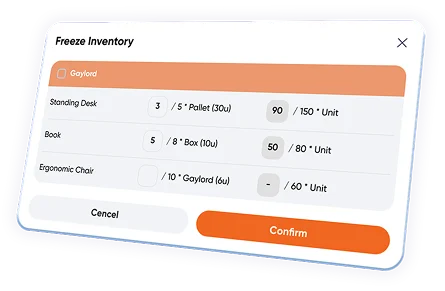
  • Easily freeze inventory from the Inventory Details page by clicking the Freeze Inventory button.
  • You can freeze all items in a storage package or freeze only
    a portion by entering specific quantities in the input fields.
  • If the entire package is frozen, it displays a Frozen label , and
    the Freeze Inventory button is no longer available.
  • If only a part is frozen, the Frozen label will appear only on
    the frozen portion , and the Freeze Inventory button will remain visible to allow freezing additional items.
Freezing Inventory

Releasing Inventory

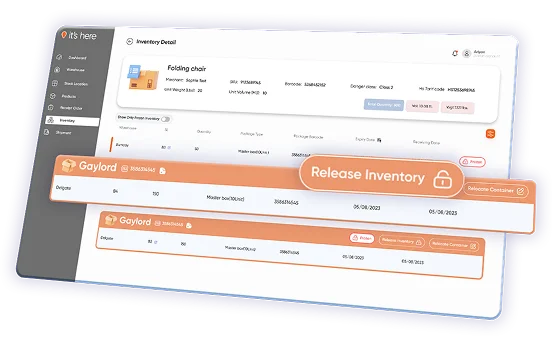
  • The user can release frozen inventory by clicking
    the Release Inventory button.
  • When clicked, a modal will open, allowing them to release as many items as needed.
Relocation Capability

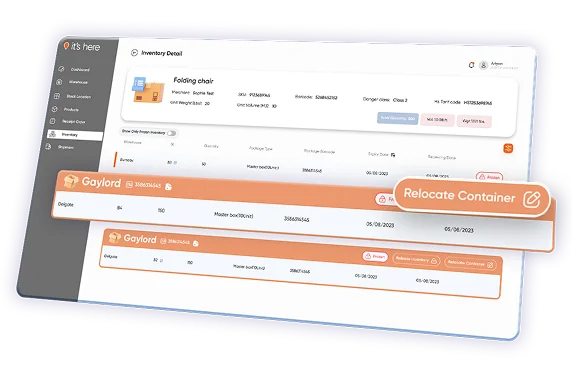
  • Frozen inventory can still be relocated.
Visibility Across the Inventory Management Software

Inventory List View

  • A lock icon is displayed on inventory items if all or part of an inventory is frozen.
  • A filter is available to show only frozen inventory items for quick review.

Inventory Detail View

  • Clearly see whether all or part of a storage package has been frozen.

Stock Location Details

  • A column is added to the Storage Package List on the Stock Location Details page to indicate whether an inventory item is frozen.

Ready to Transform Your Inventory?

Stop wasting time on spreadsheets and start focusing on growth. it’s here is
the essential Inventory Management Software designed to give your small business a competitive edge.

  • Get Real-Time Stock Tracking , not outdated estimates.
  • Eliminate stockouts with proactive Automated Low Stock Alerts .
  • Simplify purchasing, sales, and reporting with one easy platform.

Frequently Asked Questions

1. What happens if our warehouse loses internet connectivity — will inventory updates still record?

No — real-time sync requires cloud connectivity. The Scanner App can buffer some local scans until the connection returns, but accurate multi-location stock levels only refresh once connectivity resumes.

2. Can we integrate inventory events into SAP, Oracle, or other backend systems?

Yes — with work. It’s Here provides an Open API that lets technical teams push inventory changes to external systems. You’ll need to define data mappings during implementation.

3. Is there a hidden fee per scanner device or mobile user?

It depends. The vendor doesn’t publish device-or user-based pricing on the site; licensing terms are determined during contracting. Contact Sales for a custom quote.

4. Can inventory be automatically replenished when stock drops to a threshold without manual intervention?

Yes. You can set custom reorder points and receive alerts — and draft purchase orders can be generated automatically based on those conditions.

5. What controls exist to prevent overselling online before inventory syncs?

Yes — real-time updates. Inventory levels update instantly with sales, transfers, and fulfillment actions, helping avoid overselling across channels.

6. Does the system track stock movements between stores and warehouses with a complete audit trail?

Yes. It supports seamless stock transfers with audit visibility for every transfer event.

7. Will warehouse staff need extra hardware to use inventory features?

It depends. While the platform supports barcode/QR scanning via the it’s here Scanner App, you’ll need compatible handheld devices (mobile phones or scanners) to take full advantage of mobile stock counts and picks.

8. Can we get reporting on inventory performance (turnover, aging, etc.) without exporting to spreadsheets?

Yes. The Inventory Management UI includes advanced reporting and analytics to help you analyze stock levels, movements, and performance without manual exports.

Ready to Get Started?

Our software combines 3PL Choice Delivery Management Software, Warehouse Management Software (WMS), TSM, Delivery App, Fulfillment WMS, Sorting Facility WMS, and Scheduling App, offering a comprehensive suite of tools to supercharge your logistics operations.

Contact

© Copyright itshere. All Rights Reserved Designed by itshere team

Instant download