An ecommerce order has two lives.
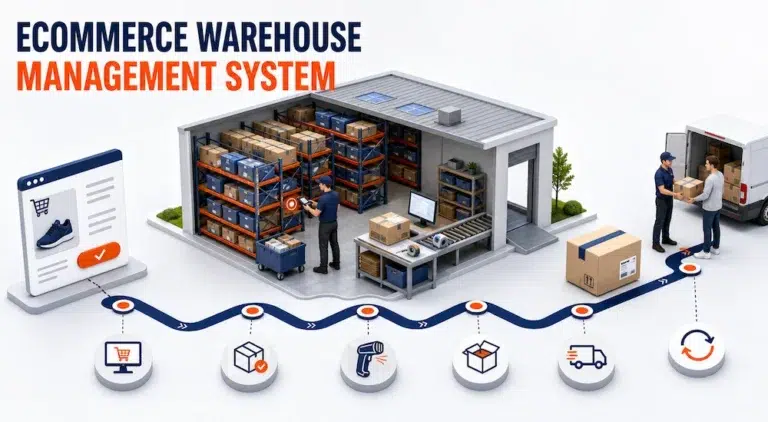
In the storefront, it is a customer purchase with products, payment, an address, and a delivery choice. In the warehouse, the same order becomes a sequence of inventory decisions and physical tasks. Stock must be available, the correct facility must own the work, items must be found and verified, packaging must be selected, and shipment data must return to the store.
An ecommerce warehouse management system keeps those two lives connected. Its role is not simply to download orders or count products. It must preserve order meaning as a digital purchase becomes warehouse work and then return trustworthy fulfillment information to the selling channel.
What Does an Ecommerce Warehouse Management System Control?
An ecommerce warehouse management system controls the warehouse side of online order fulfillment. It receives or accesses order data, checks whether the order can be executed, allocates eligible inventory, creates warehouse work, records picking and packing confirmations, supports shipment preparation, and sends completion information to connected systems.
This scope is narrower than the complete ecommerce operation. A store platform may control products, checkout, promotions, payments, and the customer account. Online store management software may coordinate broader store and order administration. The WMS begins where an accepted order needs reliable warehouse execution.
The distinction prevents teams from treating a storefront quantity as proof that stock is ready or a shipping label as proof that every item was correctly packed. Between those points, the warehouse must protect the order from data loss, inventory conflict, and incomplete work.
The Ecommerce Order Integrity Chain
The most useful way to understand an ecommerce WMS is to follow the integrity of the order rather than only the movement of a box.
| Control point | Question the system must answer | Required record | Failure signal |
|---|---|---|---|
| Capture | Did the complete order reach the warehouse? | Source order, channel, customer, items, quantities, and service data | Warehouse staff retype missing information |
| Validation | Is the order executable? | Address, item, status, hold, and instruction checks | Work begins on an incomplete or blocked order |
| Availability | Is eligible stock present? | Sellable quantity by item, state, and location | The store promises inventory the warehouse cannot use |
| Allocation | Which facility and stock should fulfill it? | Reserved inventory and fulfillment location | Two orders compete for the same units |
| Execution | Were the correct items picked and packed? | Task, scan, quantity, user, and exception history | Completion depends on memory or unverified movement |
| Shipment | Is the package ready for carrier handoff? | Package, label, carrier, tracking, and shipment confirmation | Tracking exists before warehouse work is complete |
| Synchronization | Did the store receive the correct result? | Fulfillment status, shipped quantities, tracking, and exceptions | Customer and warehouse see different order states |
Each control point should leave enough information for the next decision. If the order loses its source identifier, item ownership, status, or quantity during the handoff, later automation only moves the error faster.
Order Capture Must Preserve Store Context
The warehouse needs more than an order number. The incoming record may need the channel, merchant, product and variant identifiers, quantities, address, delivery method, handling instructions, and current fulfillment status.
The first control is identity. The product identifier used by the store must map to the product the warehouse can find and scan. If one system uses a variant ID while another relies on a SKU or barcode, the mapping must be explicit.
An order should also enter only once. Duplicate imports, repeated notifications, or manual reentry can create two warehouse records for one customer purchase. The integration should recognize the source order and determine whether a later message creates new work or updates the existing record.
Validation Separates Accepted Orders From Ready Work
An order can be valid in the storefront but not ready for warehouse release.
The address may require review, a hold may be active, a product mapping may be missing, the customer may have changed the order, or the apparent inventory may already be reserved or unavailable.
The WMS should preserve the difference between order acceptance and warehouse eligibility. This allows the team to manage exceptions without releasing work that will later need to be cancelled or rebuilt.
Availability Is a State, Not One Quantity
The store may show a single sellable number, while the warehouse maintains several inventory states.
Units may be:
- Available
- Reserved
- In receiving
- On hold
- Damaged
- Awaiting inspection
- Allocated to another order
- Located at a facility that cannot fulfill the selected service
An ecommerce warehouse management system should make clear which inventory is eligible for the current order. Broader stock planning and replenishment may belong to an inventory management system, but warehouse execution needs a dependable quantity at the specific location and state.
This distinction is important because ecommerce overselling is often a timing and eligibility problem, not simply a counting problem.
Allocation Connects Demand to a Fulfillment Location
When inventory exists in more than one warehouse, the operation must decide which location should fulfill the order. The rule may consider stock availability, order completeness, service area, delivery method, workload, or operational priority.
Shopify’s official documentation explains that online orders can be assigned according to available inventory and routing rules, and may be split when no single location can fulfill them. See Shopify’s guidance on fulfillment locations.
The WMS still needs to verify that the assigned inventory is usable and reserve it against the order. Allocation should produce a clear answer to three questions:
- Which warehouse owns the work?
- Which inventory units are reserved?
- Can the order be released as one shipment, or does it require another decision?
A split order should not appear complete merely because one warehouse finished its portion.
Picking Turns Allocation Into Verified Movement
Once the order is released, the system creates work that directs the picker to the relevant warehouse, zone, aisle, rack, bin, or pallet.
The pick record should confirm:
- The correct order
- The correct item and variant
- The required quantity
- The source location
- The employee or device confirmation
- Any shortage, damage, or substitution exception
Barcode or QR scanning can strengthen this control when the product and location records are reliable. A scan should validate a decision, not replace missing master data.
Packing Protects the Customer Order Before Shipping
Packing is the final warehouse checkpoint before an order becomes a carrier shipment. The team may need to confirm the picked items, packaging type, quantity, weight, dimensions, documents, inserts, or special instructions.
An ecommerce order can be picked correctly and still leave incorrectly if the wrong label is attached to the package. The pack station must keep the physical parcel connected to the correct order and shipment record.
Useful controls include item verification before closure, package and weight records, correct label association, required inserts or documents, and explicit exceptions for damaged or oversized items.
The system should show whether the package is ready, not force staff to infer readiness from the existence of a label.
Shipment Creation Is a Handoff, Not the End
At shipment creation, warehouse information moves toward the carrier and customer facing systems. The record may include the selected service, package details, label, tracking number, shipment time, and shipped quantities.
Carrier selection and transportation rules can become a substantial workflow of their own. When that intent becomes central, the site’s carrier management software page is the appropriate owner. The ecommerce WMS should focus on providing accurate package and order data to that handoff.
The shipment event should occur only after the relevant warehouse work is confirmed. Otherwise, the store may tell the customer that an order shipped while the package is still incomplete.
Status Synchronization Closes the Loop
The warehouse workflow is not complete until the source system receives an accurate result.
Depending on the connection, returned data may include shipped quantities, tracking, fulfillment location, holds, shortages, exceptions, and inventory changes.
The organization should define which system owns each status and how corrections are handled. A later shipment update should modify the right fulfillment record rather than create a duplicate.
This is where software integration design matters. The connection must specify field ownership, event timing, retry behavior, duplicate prevention, error visibility, and reconciliation responsibility. The goal is not to synchronize every field. It is to move the information required for the next system to act correctly.
Where Ecommerce Warehouse Workflows Usually Break
Common breakpoints include mismatched product identifiers, cancelled orders left in the pick queue, unavailable stock counted as sellable, allocation changes that do not update warehouse work, split orders reported as complete, early tracking creation, and failed updates hidden from operations.
For each breakpoint, define the owner and recovery action. A technical integration log is not enough when the warehouse must decide whether to stop or release an order.
A Verified It’s Here Ecommerce Warehouse Example
The official It’s Here Fulfillment WMS page documents connections with ecommerce platforms, including Shopify, Magento, WooCommerce, and Amazon. It also describes inventory and order updates between online stores and warehouse operations.
Verified capabilities include multiple warehouses, structured stock locations, product records, receiving and shipping orders, custom packages, inventory visibility, and scanner workflows for warehouse tasks.
These capabilities illustrate the required chain. Orders enter with merchant and product context, location records identify the stock, scans confirm execution, package data supports shipment, and status can return to the channel.
This is also where warehouse fulfillment software should be tested with real orders rather than judged from isolated features.
Test the Complete Order, Including Failure
A useful demonstration should include more than a clean order.
Prepare a test set with similar product variants, inventory in two warehouses, one held quantity, a cancellation after import, a partial fulfillment, a packaging instruction, a scan mismatch, and a shipment update that initially fails.
Ask the provider to show the order from store capture through status return. Verify which record owns each decision, how the exception becomes visible, and how the workflow recovers without creating duplicate work.
Keep the Store Promise Attached to Warehouse Reality
An ecommerce warehouse management system succeeds when the order visible to the customer remains connected to the work performed in the warehouse.
That requires more than importing orders. The system must preserve identity, validate readiness, expose eligible inventory, allocate the right location, confirm picking and packing, create an accurate shipment record, and return the result to the source channel.
The best evaluation question is therefore not, “Can the platform connect to our store?” It is, “Can one order move through every warehouse decision without losing its meaning?”
FAQ
What Is an Ecommerce Warehouse Management System?
An ecommerce warehouse management system controls the warehouse execution of online orders. It connects order data with inventory availability, allocation, picking, packing, shipment preparation, and fulfillment status updates.
How Is an Ecommerce WMS Different From an Online Store Platform?
The store platform manages the customer facing shopping and order experience. The ecommerce WMS manages the warehouse decisions and physical tasks required to fulfill the accepted order.
Can an Ecommerce WMS Prevent Overselling?
It can improve the inventory and allocation data used by connected channels, but prevention depends on accurate stock states, reservation rules, synchronization timing, and store configuration.
How Does a WMS Handle Orders From Multiple Warehouses?
The system uses inventory and fulfillment rules to assign or allocate orders to eligible locations. Orders may require splitting when no single warehouse can fulfill every item.
Which Integration Data Is Most Important for Ecommerce Fulfillment?
Critical data includes source order IDs, merchant and channel, product mappings, quantities, fulfillment locations, holds, shipped quantities, package and tracking details, and update status.