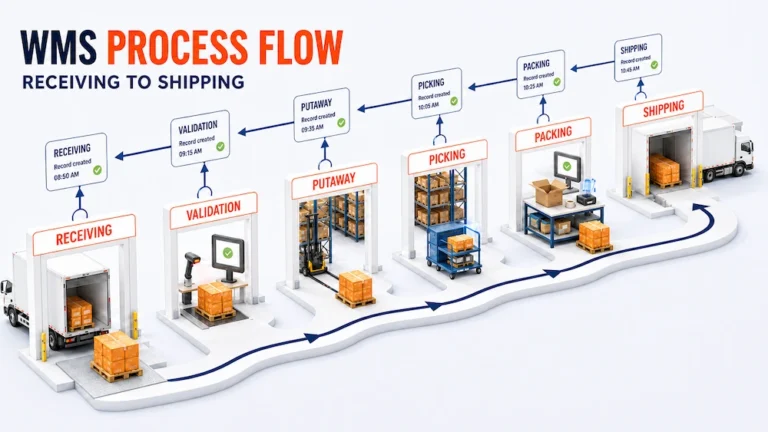
Choose one completed shipment and trace it backward.
Can the warehouse identify who packed it, which items were picked, where that stock was stored, when it was received, and which discrepancies were resolved before the inventory became available?
If the trail disappears between two activities, the warehouse has a handoff problem. Work may still move, but the system cannot reliably explain how one physical event became the next.
A warehouse management system process flow closes those gaps. It connects receiving, validation, putaway, storage, replenishment, picking, packing, shipping, and the records created at each stage. The purpose is not to force every warehouse into one rigid sequence. It is to make every transition visible enough that the next person or system can work from trusted information.
A Warehouse Process Is a Chain of Confirmed Handoffs
Warehouse diagrams often show a simple line:
Receiving → Putaway → Storage → Picking → Packing → Shipping
Receiving hands verified inventory to putaway. Putaway hands known locations to storage control. Inventory allocation hands executable demand to picking. Picking hands collected goods to packing. Packing hands verified shipments to the outbound team.
Every handoff needs four elements:
- A clear input: The item, order, task, or record entering the stage.
- A validation rule: The condition that must be true before work continues.
- A recorded event: Evidence of what physically happened.
- An exception path: A defined response when the validation fails.
Without these elements, a warehouse workflow depends on memory and local workarounds. One team may consider a pallet received at the dock. Another may wait until quantity and condition are checked. That difference can make unavailable stock appear ready for allocation.
Warehouse Management System Process Flow at a Glance
| Stage | Operational input | Required confirmation | Record passed forward | Common break |
|---|---|---|---|---|
| Receiving | Expected or unexpected inbound goods | Identity, quantity, condition, and receipt status | Verified receipt or visible discrepancy | Goods enter stock before validation |
| Putaway | Verified inventory at receiving | Destination location and completed movement | Inventory assigned to a known location | Physical move is not recorded |
| Storage and replenishment | Located, usable inventory | Current quantity, status, and pick availability | Stock ready for allocation or movement | Reserve and pick locations drift apart |
| Allocation and picking | Order demand and available stock | Correct item, quantity, and source location | Picked inventory connected to an order | Shortage appears only after searching |
| Packing | Picked goods and order requirements | Contents, package, documents, and exceptions | Shipment ready for release | Wrong item or quantity passes unchecked |
| Shipping | Verified packed shipment | Handover, departure, and shipment status | Closed outbound record | Goods leave while inventory remains available |
| Review | Completed transactions and exceptions | Record completeness and unresolved issues | Operational history for analysis | Repeated failures remain isolated incidents |
This map gives the WMS process flow a control purpose. A stage is complete only when its output is reliable enough for the next stage to act.
Receiving Must Separate Arrival From Availability
Within a warehouse management system process flow, the warehouse receiving process begins when goods arrive, but arrival should not automatically make inventory available.
The receiving team may need to compare the physical delivery with a purchase order, transfer, advance notice, or another expected record. Depending on the product and operating model, the team may verify:
- Product identity
- Quantity and unit of measure
- Package or pallet identity
- Visible damage
- Lot, serial, or expiry information
- Merchant or inventory owner
- Required documents
The system should preserve the difference between what was expected and what actually arrived.
Suppose 100 units are expected and 96 are physically present. Recording 100 creates false availability. Recording 96 without preserving the shortage removes the evidence needed for supplier follow up. The correct output is a verified receipt plus a visible discrepancy.
The ASCM guide to warehouse management similarly places inspection, scanning, and entry into the system before goods move to their designated storage locations.
Putaway Turns Received Stock Into Located Stock
Receiving confirms what entered the facility. Putaway confirms where it went.
A warehouse management system process flow should not treat that movement as an informal walk from the dock to an open space. The destination needs an identity that employees and the system understand, such as a warehouse, zone, aisle, rack, shelf, bin, floor location, or pallet position.
Putaway should answer:
- Which inventory is moving?
- What is its current location?
- Which destination is allowed to receive it?
- Has the physical movement been completed?
- Is the stock now eligible for allocation or picking?
Not every warehouse needs advanced slotting logic. Every warehouse does need location discipline. A suggested destination has little value if employees routinely place goods elsewhere without updating the record.
This article keeps detailed sortation and split point logic brief because those processes belong to a specialized Sorting Hub WMS workflow. Here, the important principle is that every internal move should leave a current source, destination, quantity, and status.
Storage Is an Active Control Stage
Storage is sometimes shown as empty space between putaway and picking. Operationally, it is an active stage.
Inventory may change status, move between locations, require a count, become damaged, reach an expiry threshold, or transfer to another warehouse. Pick locations may also need replenishment from reserve stock.
The system state should answer three different questions:
- What is physically present?
- What is usable?
- What is available for a specific demand?
Those quantities are not always the same. Ten units may be physically present while two are damaged and three are reserved. Treating all ten as available creates a problem that picking cannot solve.
Broader stock planning and availability belong to the inventory management software topic. Inside this warehouse process, the WMS must connect available inventory to physical locations, movement history, and the work that changes it.
Allocation Should Create Work That Can Be Executed
An order should not become a picking task merely because demand exists.
Before release, the system or an authorized employee may need to confirm that the order is valid, suitable inventory is available, the required location can be accessed, and any service or handling requirements are present.
Allocation connects demand with specific usable stock. Picking turns that decision into physical work.
This distinction matters when:
- Several orders compete for limited inventory
- Stock exists in more than one location
- A merchant or client owns particular inventory
- A lot or expiry rule restricts selection
- Part of an order is unavailable
- Goods require special handling
When allocation rules are unclear, pickers discover planning problems on the floor and ask supervisors to decide while the order is already in progress.
Picking Must Confirm More Than Completion
The picking stage should tell the worker what to collect and give the operation evidence about what was actually collected.
A useful task includes the order, item, quantity, source location, and relevant handling context. Confirmation may involve a scan, a quantity entry, or another controlled action appropriate to the operation.
The result should be a trustworthy relationship between the order and the inventory removed from its location.
The exception path matters just as much. If stock is missing, damaged, or in the wrong location, the process should preserve that fact instead of encouraging the worker to close the task and explain it later through a message.
This is one reason the warehouse management system process flow should be tested with shortages and wrong locations, not only perfect sample orders.
Packing Is the Final Warehouse Validation Point
Packing is where the warehouse can compare the collected goods with the order before responsibility moves to shipping or delivery.
The packer may need to confirm:
- The correct products and quantities
- Package type and dimensions
- Customer or merchant requirements
- Labels and shipment documents
- Visible damage
- Any incomplete or substituted items
Packing should not silently repair upstream errors. If the wrong item arrives, the record should show whether the cause was allocation, picking, product identification, or an earlier inventory discrepancy.
Shipping Must Close Both the Order and Inventory Movement
Loading a van or handing a parcel to a carrier is a physical event. Shipping closure is the system event that records what left, when it left, and which order or shipment it belongs to.
A reliable handoff may include shipment status, package identifiers, labels, manifests, bills of lading, carrier details, or other documents required by the operation.
The main control is simple: inventory that has physically departed should not remain available inside the warehouse record.
The verified warehouse fulfillment software capabilities from It’s Here illustrate how these stages can stay connected. The official product page documents receiving and shipping orders, warehouse and stock location records, product details, mobile barcode and QR scanning, picking and packing validation, inventory updates, order history, and support for multiple warehouses. These capabilities should still be tested against the exact handoffs and exceptions used by each operation.
Records Complete the Flow
The process does not truly end when the truck leaves.
The warehouse still needs a record that can answer later questions:
- Which receipt created the inventory?
- Which locations did it move through?
- Which employee or device confirmed each action?
- Which exceptions occurred?
- Which order consumed the stock?
- Which package and shipment carried it out?
These links create traceability and reveal where a recurring failure begins.
The warehouse management system process flow therefore runs in two directions. Operational work moves forward from receiving to shipping. Investigation moves backward from the final shipment to the original receipt.
Use a Handoff Test Before Changing the Workflow
Test the warehouse management system process flow by mapping one normal order and one exception through the current process.
At every transition, ask:
- What physical event has just occurred?
- Which record proves it?
- What information does the next stage receive?
- Who owns an incomplete or conflicting record?
- Can the original event be reconstructed later?
Then test the flow with realistic disruptions:
- A receipt contains fewer units than expected.
- A pallet is placed in a different location.
- Stock is physically present but unavailable.
- A picker cannot find the allocated item.
- Packing discovers the wrong product.
- A shipment leaves without a closed record.
The test shows where software configuration, data quality, employee training, or decision ownership needs attention. It also prevents the business from automating a sequence whose rules have never been agreed.
A Reliable Flow Leaves No Invisible Handoffs
A strong warehouse management system process flow does more than move goods through six named stages.
It separates arrival from availability, connects inventory with known locations, turns demand into executable work, verifies goods before release, closes outbound movements, and preserves the history required to investigate what happened.
The best process is not the one with the most automation or the largest number of statuses. It is the one in which each stage produces an output the next stage can trust.
Start by tracing a completed shipment backward. Every missing record reveals a handoff that needs clearer data, ownership, validation, or system support.
FAQ
What Is a Warehouse Management System Process Flow?
A warehouse management system process flow is the connected sequence used to receive, validate, locate, store, allocate, pick, pack, ship, and record inventory. Each stage should create a reliable output for the next stage.
What Are the Main Stages of a WMS Process?
The common stages are receiving, putaway, storage, replenishment, allocation, picking, packing, shipping, and operational review. The exact sequence depends on the warehouse, products, customers, and service model.
Why Is Putaway Important in the Warehouse Workflow?
Putaway connects verified inventory with a known physical location. If goods move without a recorded destination, later availability and picking decisions may be based on incorrect location data.
Where Should Inventory Exceptions Be Resolved?
An exception should be recorded at the stage where it is discovered and assigned to a clear owner. The process should also preserve its likely source so the warehouse can correct the upstream cause.
How Should a Company Test a WMS Process Flow?
Run a normal order and several imperfect scenarios from receiving to shipment. Test shortages, wrong locations, unavailable stock, picking errors, packing discrepancies, and incomplete shipping records.