The inventory report says 42 units are available. The picker finds 37 in the assigned location. Two more are sitting beside receiving without a completed receipt, and three were moved during replenishment but never recorded.
The immediate problem is a missing product. The larger problem is that the warehouse no longer has one reliable version of what happened.
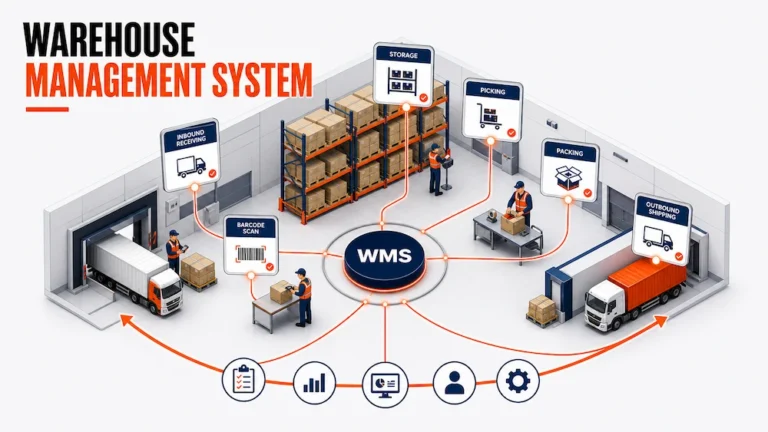
This is the operational problem a warehouse management system is designed to solve. A warehouse management system, usually called a WMS, controls how goods are received, identified, stored, moved, picked, packed, and released. It connects each physical action to a system record so the next employee can work from the current state rather than reconstructing it from memory, paper, or several spreadsheets.
What Is a Warehouse Management System?
A warehouse management system is software that directs and records the movement of inventory and work inside a warehouse.
It answers practical questions such as:
- What arrived, and was the receipt verified?
- Where should each item be stored?
- How much usable stock is available at each location?
- Which orders are ready to be picked?
- What should a worker pick, move, pack, or verify next?
- Which goods have left the building?
- Where did an exception occur, and who needs to resolve it?
A WMS is not simply a larger inventory spreadsheet. A spreadsheet stores values. A WMS creates relationships between products, locations, orders, workers, movements, and statuses. It also preserves the sequence of events that explains why the current values are what they are.
The Warehouse Has a Physical State and a System State
Every warehouse operates in two realities.
The physical state is what is actually on the floor: pallets at receiving, units in bins, cartons on pick carts, packed orders at staging, and goods loaded for shipping.
The system state is what the business believes is happening: quantities received, locations assigned, inventory available, tasks completed, and orders shipped.
Warehouse control weakens when those realities separate.
For example, a worker may move stock to make space but delay the system update. Another employee then sees an empty location in the software and assigns new stock to it. The original movement looked harmless, but it created a conflict that can affect replenishment, picking, and order completion.
The central job of a warehouse management system is to keep physical activity and system records synchronized closely enough that people can trust the next instruction.
The WMS Control Loop
The most useful way to understand how a warehouse management system works is to follow its control loop.
| Control point | Physical event | System responsibility | Operational output |
|---|---|---|---|
| 1. Receive | Goods enter the facility | Match the receipt with expected products and quantities | Verified receipt or visible discrepancy |
| 2. Identify | A product, case, pallet, or lot is recognized | Connect the physical unit to the correct product record | Traceable inventory identity |
| 3. Locate | Goods move to storage | Record the warehouse, zone, aisle, rack, bin, or pallet position | Known stock location |
| 4. Allocate | Demand is matched with available stock | Reserve suitable inventory for orders or replenishment | Executable work |
| 5. Execute | Workers pick, move, pack, or load | Guide tasks and record confirmations | Updated order and inventory state |
| 6. Close | The movement or order is completed | Preserve quantities, status, documents, and exceptions | Reliable operational history |
Each point reduces uncertainty before the next decision. An incomplete receipt creates unreliable quantities. A wrong location can reserve stock that a picker cannot find. An incomplete shipment can leave departed inventory available in the system.
How a WMS Supports Core Warehouse Operations
Receiving and Validation
Receiving establishes the first trusted record.
The team compares what was expected with what arrived, records quantities, identifies damaged or missing goods, and captures relevant product or lot information. Discrepancies should remain visible until someone resolves them.
Identification standards also matter when goods move between organizations. The GS1 Logistic Label Guideline explains how a unique Serial Shipping Container Code can connect the physical movement of a logistics unit with the electronic records that describe it.
Putaway and Storage
Putaway determines where received goods should live.
The appropriate location may depend on product dimensions, handling rules, item velocity, available space, expiry dates, or proximity to the pick area. The WMS records the destination and confirms the move.
Replenishment and Allocation
Replenishment moves reserve inventory closer to picking while preserving the movement record. Allocation then connects demand with suitable stock based on location, quantity, lot, expiry, ownership, or order priority.
Picking, Packing, and Shipping
Picking confirms the product, quantity, and location. Packing verifies the order and records the package. Shipping closes the warehouse workflow and provides information to the carrier or delivery operation.
Scanning can support these transitions, but scanning alone does not create control. The scanned identifier must update the correct product, location, order, and status. Otherwise, the warehouse has captured an event without improving the reliability of the process.
WMS, Inventory Management, and Sorting Are Not the Same
Related systems may share data, but they answer different questions.
| System or function | Primary question | Typical scope |
|---|---|---|
| Warehouse management system | How should inventory and work move inside the facility? | Receiving, locations, putaway, replenishment, picking, packing, and shipping |
| Inventory management system | How much inventory exists, where is it, and when should it be replenished? | Stock levels, availability, adjustments, transfers, and inventory records |
| Order management system | What has the customer ordered, and what must happen to fulfil it? | Order capture, status, allocation, changes, and customer records |
| Sorting hub system | How should incoming units be identified, separated, consolidated, and released? | Arrival, scanning, sorting, split points, consolidation, and outbound status |
| Delivery management system | How should completed shipments move from dispatch to delivery? | Scheduling, routing, dispatch, tracking, and proof of delivery |
This distinction protects system design as well as SEO ownership. An inventory management system may provide the stock picture, while a WMS directs the warehouse activities that change that picture. A specialized Sorting Hub WMS goes deeper into sorting facility workflows that a general WMS guide should not attempt to reproduce.
The Data a WMS Needs Before It Can Direct Work
Software cannot create reliable instructions from incomplete operating data.
- Product data: identifiers, dimensions, weight, handling rules, packaging, lot, serial, and expiry information.
- Location data: a consistent hierarchy that means the same thing on screen and on the floor.
- Inventory state: clear distinctions between expected, received, available, reserved, damaged, picked, packed, and shipped stock.
- Order and task data: demand, priority, quantity, service rules, and completion conditions.
- Event history: records of important movements, confirmations, adjustments, and exceptions.
What Should Be Automated and What Still Needs Judgment?
Automation works best when a decision repeats frequently, uses reliable data, and follows a rule the operation can explain.
Good candidates may include:
- Suggesting putaway locations from defined rules
- Creating replenishment work when a pick location reaches a threshold
- Reserving eligible inventory for standard orders
- Generating routine picking tasks
- Updating status after a verified scan or confirmation
Human review remains important when goods arrive damaged, identifiers do not match, priorities conflict, or the data does not describe the situation accurately. A WMS should make these exceptions visible instead of forcing them through a normal workflow.
What a Connected Warehouse Workflow Can Look Like
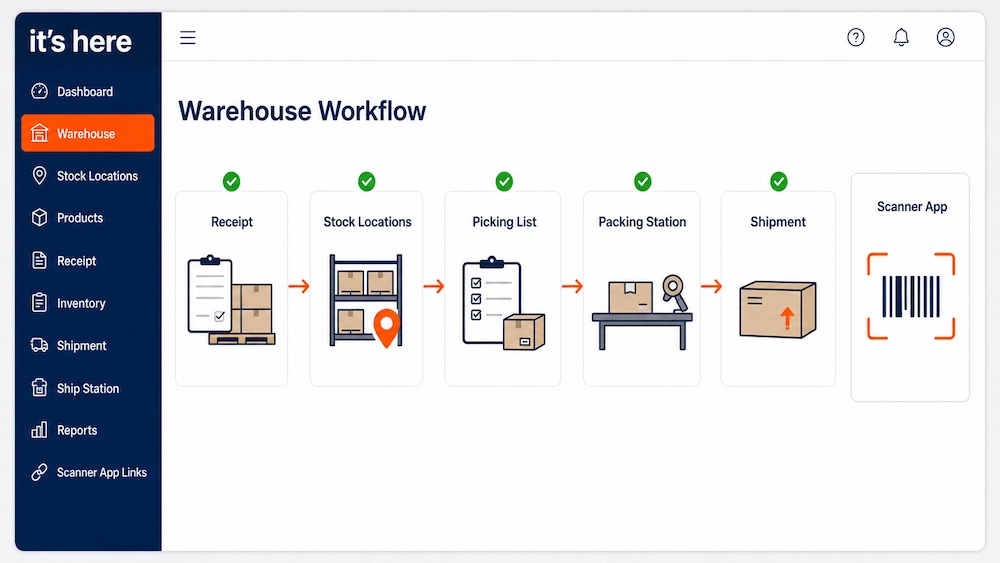
The verified warehouse fulfillment software capabilities from It’s Here provide a practical example of connected warehouse records.
The platform documents support for multiple merchants and warehouses, warehouse locations such as aisles, racks, bins, and pallets, product records with SKU and physical details, receiving and shipping orders, stock visibility, interwarehouse transfers, and scanner workflows for receiving, picking, packing, transfers, and inventory audits.
Those capabilities matter when they preserve context. Product received for one merchant should remain connected to that owner. A scan should update the correct inventory and order record. Completed shipping data should reach the next system without manual reconstruction.
That final connection often depends on the organization’s software integration design. The warehouse team should define which system owns each field and which events must move between ecommerce, ERP, carrier, accounting, and delivery platforms.
Signs a Warehouse Is Ready for a WMS
A business does not need a WMS simply because it operates a warehouse. The need becomes clearer when coordination and control problems repeat.
Common signals include:
- Staff maintain several versions of the inventory record
- Location knowledge depends on experienced employees
- Receiving discrepancies are corrected without a visible exception process
- Pickers regularly search for stock the system says is available
- Order volume requires more manual checking at the same rate it grows
- Transfers, adjustments, and damaged inventory are difficult to trace
- New employees cannot follow the process without constant verbal guidance
- Completed warehouse work must be entered again into another system
The strongest signal is the effort required to keep physical work and system records aligned, not warehouse size alone.
Define the Operating Model Before Selecting Software
Before comparing products, follow several real orders and document how work actually happens.
For each order, identify:
- Where product and order data enter the operation
- How receipts and discrepancies are confirmed
- How locations are assigned and updated
- When inventory becomes available
- How work is prioritized and assigned
- Which confirmations workers must record
- How exceptions are escalated
- What information must reach shipping, billing, or delivery
Then define the minimum data, status, and ownership required at each transition. This prevents unclear processes from being reproduced in a new interface.
From Warehouse Activity to Operational Control
The missing units in the opening example are not just an inventory problem. They reveal several uncontrolled transitions: an incomplete receipt, an unrecorded move, and a system quantity that no longer represents the floor.
Understanding what is warehouse management system begins with those transitions. A WMS creates a control loop that connects receiving, identification, location, allocation, execution, and closure. Its value comes from making the current state trustworthy enough for the next person and the next system to act.
The goal is not to automate every decision or collect more data than the operation can use. It is to create a warehouse where standard work follows visible rules, exceptions receive attention, and every important movement leaves a reliable record.
FAQ
What Is the Main Purpose of a Warehouse Management System?
The main purpose of a WMS is to direct and record inventory movement and warehouse work. It helps keep physical goods, system quantities, locations, orders, and task status aligned.
How Is a WMS Different From Inventory Management Software?
Inventory management software focuses on stock levels, availability, adjustments, and replenishment. A WMS goes deeper into warehouse execution, including receiving, putaway, location control, picking, packing, and shipping.
Does Every Warehouse Need a WMS?
No. A small and predictable operation may work well with a disciplined shared system. A WMS becomes more valuable when locations, order volume, staff, clients, inventory states, and exceptions make manual coordination difficult to control.
Can a Warehouse Management System Work With an ERP?
Yes. The ERP may own financial, purchasing, and wider business records, while the WMS controls warehouse execution. The organization should define which system owns each data field and how receipts, inventory changes, orders, and shipment confirmations move between them.
Does a WMS Eliminate Manual Warehouse Work?
No. It can structure tasks, apply repeatable rules, and capture confirmations, but workers and managers still handle physical execution, unusual conditions, damaged goods, data conflicts, and operational judgment.