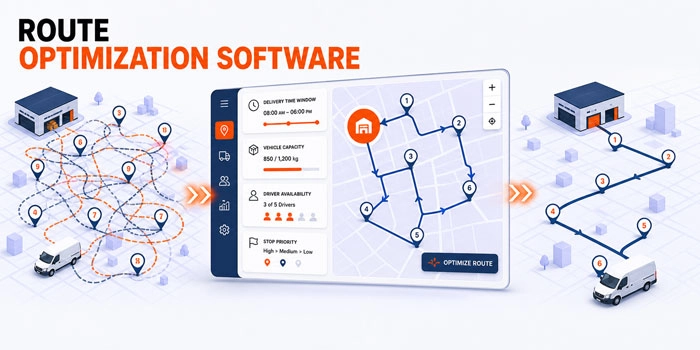
A dispatcher has 86 deliveries, six drivers, three vehicle types, several customer time windows, and one driver who cannot start before 10 a.m.
Every address is valid. Every order is ready. Yet thousands of possible route combinations remain.
Putting the closest stops together may look efficient, but distance is only one part of the decision. Vehicle capacity, delivery priority, service time, driver availability, customer commitments, and the location of the depot can all change which route is actually workable.
This is the problem behind what is route optimization software. The software evaluates possible ways to assign and sequence stops, applies operational constraints, and produces routes that support a defined objective.
The goal is not simply to draw shorter lines on a map. It is to create routes that drivers can execute and the delivery operation can control.
What Is Route Optimization Software?
Route optimization software is a system that assigns delivery stops to vehicles and determines an efficient stop sequence while considering operational constraints.
Those constraints may include:
- Vehicle capacity
- Customer time windows
- Driver availability
- Service duration
- Delivery priority
- Depot locations
- Start and end times
- Vehicle or service requirements
- Maximum route duration
- Pickup and delivery relationships
The software combines this information with travel data and an optimization objective.
That objective may be to reduce total distance, balance driver workloads, complete routes earlier, protect customer time windows, use fewer vehicles, or create a practical compromise between several goals.
This is an important distinction. The shortest route is not always the best route.
A short route that overloads a vehicle, sends a driver to a customer before the accepted time, or ignores a required service may be mathematically attractive but operationally unusable.
Route Planning and Route Optimization Are Not the Same
Route planning is the broader process of preparing work for drivers. It can include selecting orders, grouping stops, choosing vehicles, creating routes, reviewing the plan, and releasing it for execution.
Route optimization is the decision process used to improve how stops are assigned and sequenced.
| Activity | Main question | Example |
|---|---|---|
| Route planning | What work should each route contain? | Creating three routes for tomorrow |
| Route optimization | Which assignment and sequence best support our goals? | Reordering stops to respect capacity and time windows |
| Dispatch management | Who owns the work, and what changes during execution? | Reassigning a stop after a driver becomes unavailable |
| Navigation | How should the driver travel between the current stop and the next one? | Providing turn by turn directions |
| Delivery tracking | What is happening after the route has started? | Monitoring status, location, and ETA |
These functions support different stages of delivery operations. Route optimization improves stop assignment and sequencing, navigation guides the driver between locations, and dispatch manages ownership and operational changes after release.
How Route Optimization Software Works
The easiest way to understand how route optimization software works is to follow the information through seven stages.
1. Collecting Delivery Data
The process begins with accurate information about the work that must be completed.
Useful order data includes:
- Valid pickup or delivery address
- Requested date and accepted time window
- Estimated service duration
- Order size, weight, or priority
- Customer instructions
- Required service or equipment
Incomplete information weakens the route before optimization begins. A missing service duration or an unrecorded two person requirement can make an otherwise efficient route impossible to execute.
2. Defining Available Resources
The system also needs current information about available drivers, vehicle capacity, working hours, starting locations, qualifications, and existing assignments.
Vehicles and drivers should not be treated as interchangeable resources. A route may require a particular capacity, vehicle type, crew, or service qualification.
3. Applying Operational Constraints
Constraints define which solutions are allowed.
| Constraint | Question the system must answer | Risk if ignored |
|---|---|---|
| Capacity | Can the vehicle carry the assigned work? | Overloaded or incomplete route |
| Time window | Can the driver arrive during the accepted period? | Missed customer commitment |
| Service duration | How long will the driver remain at the stop? | Unrealistic route timing |
| Driver hours | Can the work fit within availability? | Route cannot be completed as planned |
| Vehicle requirement | Is the correct vehicle assigned? | Delivery cannot be performed |
| Priority | Which orders must be protected first? | Important work is delayed |
| Depot rule | Where must the route start or finish? | Incorrect travel assumptions |
| Pickup and delivery | Must one stop occur before another? | Invalid stop sequence |
According to the Google OR Tools explanation of vehicle routing, real routing problems can include multiple vehicles, capacities, time windows, and other resource limitations.
The more closely the constraints reflect actual operations, the more useful the resulting routes can become.
4. Choosing an Objective
The software needs a definition of improvement.
Possible objectives include:
- Reducing total travel distance
- Reducing total route time
- Balancing work across drivers
- Protecting high priority deliveries
- Minimizing the longest route
- Reducing the number of vehicles required
- Increasing the number of feasible stops
These goals can conflict.
Reducing total distance may place more work on one driver. Balancing every route equally may increase overall travel. Protecting narrow customer windows may require a less compact geographic sequence.
A useful route optimization policy therefore reflects the priorities of the business rather than chasing one universal measure of efficiency.
5. Generating a Feasible Solution
Once orders, resources, constraints, and objectives are defined, the software searches possible assignments and stop sequences.
For a small number of stops, comparing routes manually may be possible. As the number of stops and vehicles increases, the number of possible combinations grows rapidly.
Optimization methods narrow that search and identify a feasible or near optimal solution within a practical period.
This does not mean every route is mathematically perfect. Real delivery problems can become too complex for every possible solution to be evaluated. A useful result is often a strong, feasible plan that respects important constraints and can be produced in time for operations.
6. Reviewing and Adjusting the Plan
Software output should be treated as an operational recommendation, not an unquestionable instruction.
A dispatcher may know that:
- A location is difficult to access at a particular hour
- A driver is more suitable for a specific customer
- Construction has changed local travel conditions
- One order is likely to require additional service time
- A customer commitment carries unusual importance
That knowledge may justify a manual adjustment.
The strongest workflow combines automated analysis with visible dispatcher control. The system handles repeated calculations, while the dispatcher reviews unusual conditions and high impact decisions.

7. Releasing and Monitoring Routes
Optimization creates the plan. Execution tests it.
Drivers need current route information, stop details, customer instructions, and completion requirements. Dispatch needs visibility into progress and a way to recognize when actual execution moves away from the plan.
This is where route optimization connects with delivery management software.
The verified It’s Here workflow includes manual and automated route optimization, multiple draft routes, a driver route planner, real time shipment and driver visibility, delivery statuses, live ETA, order history, and photo and signature proof of delivery.
These capabilities connect the route plan with the wider delivery process. Dispatchers can prepare and adjust routes while preserving the information needed during execution and completion.
What Route Control Looks Like in Practice
A route should remain understandable after the software generates it. Dispatchers need to see which orders belong to the route, where the stops are located, which delivery conditions apply, and who is responsible for execution.
In the It’s Here workflow, route information can be reviewed alongside a map, order details, delivery windows, service requirements, and driver information. This gives the dispatcher a visible operating plan rather than a route sequence that can only be accepted or rejected.
Once the route is scheduled, the same operational context helps the team review individual stops and monitor how the released plan moves into execution. The value of this connection is not simply visual convenience. It reduces the need to reconstruct route information across separate files, messages, and driver records.

The Route Optimization Input to Output Model
A route is only as reliable as the information and rules used to create it.
| Layer | Required information | Result |
|---|---|---|
| Demand | Orders, locations, dates, priorities, service requirements | Work that needs to be routed |
| Resources | Drivers, vehicles, capacity, availability | Feasible operating capacity |
| Constraints | Time windows, hours, service rules, route limits | Boundaries the plan must respect |
| Objective | Distance, time, workload, service priority | Definition of a better route |
| Optimization | Assignment and sequence calculations | Proposed route plan |
| Human review | Local knowledge and exception judgment | Approved operational plan |
| Execution data | Status, location, ETA, completion evidence | Feedback for future planning |
This model explains why buying an algorithm does not automatically improve routing.
If accepted time windows are stored in emails, vehicle capacities are inaccurate, or service durations are never recorded, the software begins from an incomplete version of reality.
The first improvement may therefore be better data discipline rather than more advanced optimization.
When Manual Route Planning Still Works
Manual planning may remain practical when routes are small, repeat regularly, use flexible customer windows, and rarely require major changes.
The process begins to reach its limit when planning consumes several hours, workloads become inconsistent, customer windows are frequently missed, or one employee’s memory becomes essential to every route.
At that point, route optimization software can reduce repeated calculation and provide a more consistent starting plan.
What Route Optimization Software Should Not Be Expected to Do
Software cannot correct every operating problem.
It cannot reliably optimize information that has not been recorded. It cannot make an impossible set of customer commitments feasible. It cannot predict every delay, access issue, or service exception.
It also should not remove all human review.
A route may satisfy the configured rules while overlooking context that exists only in the dispatcher’s experience. The practical goal is to make that knowledge visible over time so recurring decisions can become better data or clearer operating rules.
Route optimization should support four outcomes:
- Feasibility: The route can be performed with the available resources.
- Efficiency: Unnecessary travel and avoidable workload are reduced.
- Clarity: Dispatchers can understand and adjust the plan.
- Executability: Drivers receive enough information to complete the work.
A route that performs well in only one area is not fully optimized for the operation.
How to Prepare for Route Optimization Software
Before implementation, follow several real orders from intake to completion.
Document:
- How addresses and time windows enter the system
- How service duration is estimated
- How vehicle and driver requirements are recorded
- How orders are grouped today
- Which decisions depend on dispatcher knowledge
- How routes are reviewed and released
- What happens when the plan changes
- Which completion data returns to the office
Then identify the constraints that are mandatory and the preferences that can be flexible.
For example, vehicle capacity may be a mandatory limit, while balancing the exact number of stops across drivers may be a preference.
This distinction matters. If every preference is treated as a fixed rule, the software may struggle to produce a feasible plan. If important rules are treated as optional, the result may look efficient but fail during execution.
Start with a limited set of reliable constraints, test the output with real orders, and compare the proposed plan with what actually happens.
How to Measure Route Optimization Performance
Route performance should be measured across comparable delivery days rather than judged by how compact routes appear on a map.
Useful measures include:
- Route preparation time
- Planned versus actual distance
- Route completion time
- Time window compliance
- Number of manual route changes
- Failed deliveries connected to routing decisions
Compare similar service areas and operating conditions. An urban route and a rural route should not be evaluated without accounting for differences in travel, density, and service time.
Route Optimization as a Learning Process
The most useful routing workflow does not end when the route is released.
Every completed route creates feedback.
If the same stop consistently takes longer than planned, its service duration may need adjustment. If a particular time window repeatedly creates delays, the commitment may need review. If dispatchers frequently override one assignment rule, the rule may not reflect operational reality.
That creates a continuous cycle:
Plan → review → execute → compare → improve
It’s Here supports this wider operating context by connecting route preparation with driver workflows, visibility, delivery status, order history, ETA, and proof of delivery.
The role of the software is not to promise a perfect route every morning. It is to help the organization make routing decisions from better information and improve those decisions as operational evidence grows.
Conclusion
Understanding what is route optimization software begins with separating route efficiency from simple geographic proximity.
The software evaluates orders, vehicles, drivers, constraints, and business priorities before recommending how stops should be assigned and sequenced. The resulting route must be feasible for the fleet, understandable to dispatch, useful to drivers, and consistent with customer commitments.
Successful route optimization depends on three things: reliable input data, clearly defined operating rules, and human review of important exceptions.
When those elements work together, route optimization software becomes more than a tool for reducing distance. It becomes a repeatable process for turning a complex order pool into routes the delivery team can realistically execute.
FAQ
What Is the Main Purpose of Route Optimization Software?
The main purpose is to assign and sequence delivery stops efficiently while respecting constraints such as capacity, time windows, driver availability, and service requirements.
Is Route Optimization the Same as GPS Navigation?
No. Navigation guides a driver between locations. Route optimization decides which stops should be assigned to each vehicle and in which order they should be completed.
Does Route Optimization Always Create the Shortest Route?
Not necessarily. The shortest route may violate capacity, time windows, driver hours, or customer priorities. The best route is the one that supports the selected objective while remaining operationally feasible.
Can Dispatchers Manually Change an Optimized Route?
They should be able to review and adjust routes when local knowledge or unusual conditions justify a change. It’s Here documents both manual and automated route optimization.
What Data Is Needed for Route Optimization?
Useful inputs include accurate addresses, service durations, customer time windows, order requirements, vehicle capacities, driver availability, depot locations, and delivery priorities.