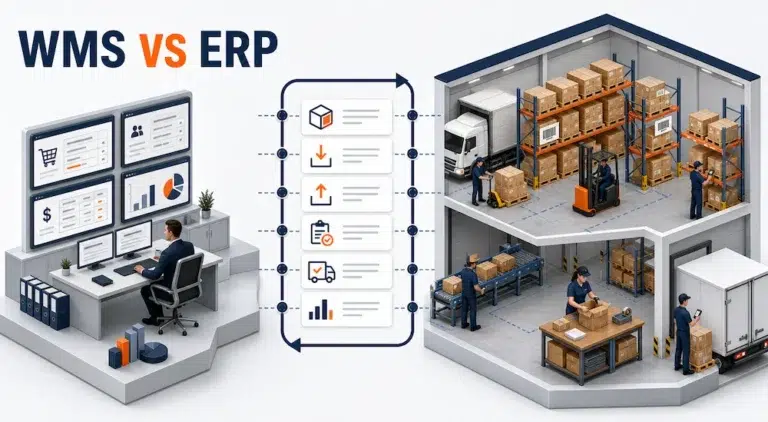
Two systems can display the same order and still be responsible for completely different decisions.
An ERP may show that a customer ordered 40 units. A WMS may show which warehouse owns the order, where those units are stored, who picked them, and whether the cartons are ready to leave.
Confusion begins when both systems are expected to control the same event. One quantity changes in the ERP, another changes in the warehouse, and neither team knows which record should be trusted.
The practical WMS vs ERP question is therefore not which system is more powerful. It is which system should own each business decision, physical action, and status update.
The Shortest Useful Difference Between WMS and ERP
An enterprise resource planning system coordinates broad business records and transactions across areas such as purchasing, sales, finance, accounting, customer accounts, and company level inventory.
A warehouse management system controls physical warehouse execution. It directs and records receiving, putaway, storage, replenishment, picking, packing, movement, counting, and shipping activity at the location level.
The ERP represents the commercial commitment. The WMS turns that commitment into executable warehouse work.
That boundary tells the team where a transaction begins, where physical execution occurs, and which result must return to the business system.
WMS vs ERP at a Glance
| Decision area | Typical ERP responsibility | Typical WMS responsibility | Shared information |
|---|---|---|---|
| Purchasing | Supplier, purchase order, expected quantity, and financial terms | Receiving plan, dock activity, inspection result, and putaway | Purchase order reference, item, quantity, receipt status |
| Sales | Customer order, commercial terms, order status, and invoicing | Allocation, release, picking, packing, and shipment confirmation | Sales order reference, item, priority, shipped quantity |
| Inventory | Enterprise quantity, valuation, ownership, and planning | Quantity by warehouse location, status, container, lot, or serial | Item master, unit, adjustment, availability, and movement result |
| Warehouse labor | Employee or cost records at company level | Assigned task, scan, movement, exception, and completion history | User identity and operational outcome |
| Shipping | Customer commitment and order completion | Package preparation and warehouse handoff | Package, shipped quantity, tracking, and confirmation |
| Finance | Accounts payable, accounts receivable, general ledger, and financial reporting | Operational evidence that supports posting | Receipt, shipment, adjustment, and service event |
The boundary depends on the operating model. The organization must choose one owner for each record instead of allowing independent changes in both systems.
Follow One Purchase Order Through Both Systems
A purchase order usually begins in the ERP because purchasing is a commercial process. The ERP holds the supplier, ordered items, expected quantities, legal entity, and financial context.
The warehouse needs enough information to prepare and execute the receipt without recreating the commercial agreement.
The WMS may use the purchase order reference to:
- Anticipate the inbound shipment.
- Direct staff to the correct receiving workflow.
- Record the quantity that physically arrived.
- Capture damage, shortage, lot, serial, or inspection information.
- Direct accepted stock to a warehouse location.
- Return a receipt result to the ERP.
If the supplier sent 96 units against an expected 100, the warehouse should record what arrived. The ERP should determine how the result affects purchasing and financial records.
This separation avoids asking warehouse staff to make accounting decisions or finance teams to infer physical receipt from a supplier document.
Follow One Customer Order in the Other Direction
An outbound order normally reaches the warehouse after the commercial system accepts the demand.
The ERP or order system may provide:
- Customer and order identifiers
- Items and quantities
- Requested service or date
- Fulfillment location when already determined
- Holds, priority, or handling requirements
The WMS translates that demand into warehouse execution. It verifies eligible inventory, allocates stock, creates picking work, confirms movement, supports packing, and records what actually shipped.
The ERP needs shipped quantities and completion status so it can update the order and continue the business process.
This is why a shipping label should not automatically close a sales order. A label may exist before every item has been verified and packed. Shipment confirmation should reflect completed warehouse work rather than an intermediate document.
What the ERP Should Usually Own
The ERP should normally remain authoritative for records that describe the business relationship or financial meaning of a transaction.
These commonly include:
- Customer and supplier accounts
- Sales and purchase orders
- Legal entities
- Commercial terms
- Accounts payable and receivable
- Financial posting
- Enterprise reporting
- Inventory valuation
- Product master governance
Product information may be shared, but ownership must remain explicit. The WMS may require identifiers, units, dimensions, barcodes, storage rules, and handling attributes without redefining the ERP item.
What the WMS Should Usually Own
The WMS should own the detailed record of what physically happened inside the warehouse.
That includes:
- Warehouse, zone, aisle, rack, bin, pallet, or container location
- Receiving confirmation
- Putaway tasks
- Inventory status at the operational location
- Reservations and allocation for warehouse work
- Replenishment movement
- Picking and packing confirmation
- Cycle counting activity
- Warehouse exceptions
- Shipment readiness
This location and task control is where warehouse fulfillment software provides a focused operational layer.
The ERP may hold the enterprise inventory position while the WMS explains where stock is and whether it can support the current task. Broader planning remains part of the inventory management software topic family.
Overlap Is Normal, Conflicting Ownership Is Not
Both systems may display orders, products, quantities, receipts, and shipment statuses. Shared context is not automatically duplication.
The risk appears when both can independently create or alter the same authoritative fact.
For example, both systems may display on hand inventory. The WMS may calculate that position from receipts, picks, moves, holds, and counts. The ERP may need a synchronized quantity for planning and reporting. If a user changes either number without a controlled transaction, the records can diverge.
Use three labels for shared data:
- Owner: the system allowed to create or change the authoritative record
- Consumer: a system that receives the record to support another process
- Reference: a copied identifier or attribute used to preserve context
Every important field should have one owner, even when several systems display it.

The WMS ERP Interface Contract
Before discussing technical methods, document the operating contract between the systems.
| Data exchange | Direction | Trigger | Essential control |
|---|---|---|---|
| Product and reference data | ERP to WMS | Approved master data change | Stable identifiers and units |
| Inbound order | ERP to WMS | Purchase or transfer work becomes eligible | Unique source reference and valid lines |
| Receipt result | WMS to ERP | Receiving reaches a defined completion state | Actual quantity, status, and exception details |
| Outbound order | ERP to WMS | Customer demand is released | No duplicate work and clear hold handling |
| Shipment result | WMS to ERP | Warehouse confirms shipment | Shipped quantity, package, and status |
| Inventory adjustment | Defined by policy | Count, damage, hold, or correction | Reason, time, location, and reconciliation owner |
| Error response | Both directions | Message fails validation or processing | Visible queue, assigned owner, and recovery action |
Microsoft’s current guidance for connecting warehouse management with external ERP systems groups required exchanges into master data, document data, and progress data. It also emphasizes keeping on hand inventory aligned. See the official Microsoft guidance for exchanging WMS data.
The interface must also define timing, retry behavior, duplicate prevention, status mapping, and correction rules. Those decisions belong in the integration design, while the site’s software integration page remains the owner of broader transactional integration intent.
When an ERP Warehouse Module May Be Enough
A separate WMS is not automatically necessary.
An ERP warehouse module may be sufficient when:
- Warehouse processes are simple and predictable
- Staff can work without detailed directed tasks
- Location control is limited
- Order volume and exception frequency are manageable
- Existing scanning and traceability meet operational needs
- One system can support the required process without offline workarounds
The test is operational evidence, not company size. If the current system preserves inventory accuracy, directs work clearly, records exceptions, and supports the required throughput, adding another platform may create unnecessary complexity.
When a Dedicated WMS Becomes Necessary
A dedicated WMS becomes more relevant when warehouse execution needs deeper control than the ERP environment can practically provide.
Signals include:
- Workers depend on paper, memory, or separate spreadsheets
- Inventory exists but cannot be located quickly
- Different item states must be controlled at location level
- Picking requires scan verification or specialized workflows
- Multiple warehouses or merchants create operational complexity
- Replenishment and allocation decisions require warehouse context
- Exceptions are discovered after orders should have shipped
- The ERP requires extensive customization to support routine warehouse work
Test receiving, putaway, picking, packing, counting, cancellation, shortage, and correction scenarios before deciding whether the ERP module is enough.
How It’s Here Fits the Warehouse Side
It’s Here documents a Fulfillment WMS designed around warehouse and inventory execution. Verified capabilities include multiple warehouses, structured locations, receiving and shipping orders, product records, inventory visibility, scanner workflows, picking, packing, transfers, audits, custom packages, and carrier connections.
Those capabilities belong primarily on the WMS side of the boundary. They organize and record physical warehouse work. Whether and how they exchange data with a particular ERP must be confirmed for the required systems and workflow rather than assumed from a general integration statement.
During a demonstration, use one source order and ask the team to show:
- Which system creates the order.
- How the warehouse receives it.
- Which system owns item and status changes.
- How physical work is verified.
- What result returns after receipt or shipment.
- How a failed exchange becomes visible and recoverable.
Define the Boundary Before Selecting the Software
The WMS vs ERP decision becomes manageable once every important transaction has a clear owner.
Use the ERP for the broad commercial and financial record. Use the WMS for detailed physical execution when the warehouse requires stronger location, task, scan, inventory state, and exception control. Let both systems display the context they need, but do not let both independently redefine the same fact.
When both are required, integration is not merely a connection between two databases. It is a controlled handoff between a business commitment and its physical result.
FAQ
What Is the Main Difference Between WMS and ERP?
An ERP manages broad business transactions and financial records, while a WMS controls detailed physical warehouse execution such as receiving, putaway, picking, packing, movement, and shipment confirmation.
Can a WMS Replace an ERP?
A WMS generally does not replace company wide financial, purchasing, sales, and accounting functions. It can operate as a specialized warehouse execution layer connected to an ERP or order system.
Does Every ERP Need a Separate WMS?
No. An ERP warehouse module may be enough for simple operations. A dedicated WMS becomes more relevant when the operation needs deeper location control, scanning, directed work, traceability, or exception management.
Which System Should Own Inventory?
Ownership should be defined by inventory fact. The WMS may own physical location, status, and task transactions, while the ERP consumes synchronized quantities for planning, valuation, and reporting. One system must remain authoritative for each field or event.
What Data Should Move Between a WMS and ERP?
Common exchanges include product references, inbound and outbound orders, receipt results, shipment confirmations, inventory adjustments, status changes, and error responses. Each exchange needs a clear trigger, owner, identifier, and recovery rule.