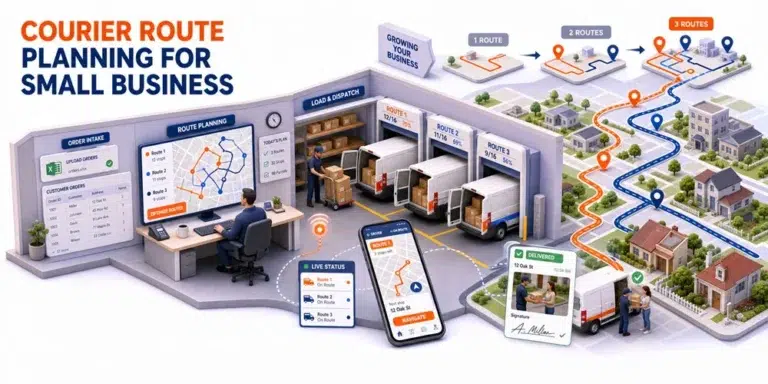
The first route planning system a small courier company needs is rarely the one with the longest feature list.
It is the one that can turn today’s orders into practical driver routes without creating more administrative work than it removes.
For one business, that may mean importing a spreadsheet, arranging stops for three drivers, and sending clear routes to their phones. Another company of the same size may need customer time windows, different vehicle capacities, repeat pickups, special delivery instructions, and proof of delivery.
Choosing courier route planning software for small business therefore depends less on fleet size than on the number of decisions required to prepare and complete each route.
Effective courier route planning software for small business should simplify those decisions without removing the dispatcher’s ability to review and adjust the final plan.
This guide explains which capabilities matter first, which ones become important as operations grow, and how to test whether a platform fits the way a small courier business actually works.
For the technology and constraints behind route creation, read our route optimization software guide.
Begin With Route Complexity, Not Driver Count
A company with ten drivers may operate predictable recurring routes. A business with three drivers may receive changing orders throughout the day, serve several delivery windows, and use different vehicles for different work.
The second operation may need more route planning support despite having a smaller fleet.
The need for courier route planning software for small business is therefore determined by operational complexity, not by reaching a fixed number of drivers.
Route complexity usually increases when:
- Orders arrive through several channels
- Daily delivery locations change
- Customers request specific time windows
- Drivers begin from different locations
- Vehicles have different capacities
- Stops require different service durations
- Pickup and delivery work must be coordinated
- Priority orders enter after planning has begun
- More than one person prepares or changes routes
- Clients require photos, signatures, or delivery records
Document which of these conditions apply before evaluating software.
The objective is not to prepare for every possible future requirement. It is to support the current workflow while leaving enough room for the next realistic stage of growth.
A Small Business Route Complexity Ladder
Use this model to identify the level of route planning support the business needs.
| Level | Operating pattern | Primary requirement | Main planning risk |
|---|---|---|---|
| 1. Simple daily routes | Few drivers and changing stops | Fast multi stop route creation | Time lost arranging addresses manually |
| 2. Shared planning | More than one office user | Central order and route records | Conflicting versions of the plan |
| 3. Constraint based routing | Windows, capacities, or priorities | Rules that produce feasible routes | Efficient looking routes that cannot be completed |
| 4. Connected execution | Drivers and dispatch need current information | Driver app and route visibility | Office and drivers using different plans |
| 5. Growth ready operation | More clients, users, areas, and services | Repeatable workflows and retrievable records | Administrative work growing with every order |
The right product should perform well at the current level and support the next expected transition.
This framework helps teams evaluate courier route planning software for small business against their current workflow and next realistic stage of growth.
Buying far beyond that point may introduce unnecessary complexity. Buying only for today may force the company to rebuild its process as soon as more customers or drivers are added.
1. Simple and Reliable Order Intake
Route planning begins with the order list.
A small courier company may receive orders through:
- Phone calls
- Ecommerce systems
- Client spreadsheets
- Online forms
- Recurring customer lists
- Connected business systems
The software should make it easy to create one reliable order pool from those sources.
When evaluating courier route planning software for small business, ask whether users can:
- Enter individual orders
- Import multiple records
- Search and filter orders
- Edit incorrect information
- Identify duplicate or incomplete records
- Select several orders for planning
- Review locations on a map
- Preserve customer instructions
- Export operational information
The process should not require dispatch to repeatedly copy the same address and instructions between tools.
Within It’s Here, verified scheduling capabilities include manual order entry, Excel upload, a centralized Order Pool, search, filtering, multiple order selection, editing, exporting, deletion, restoration, and Map View.
These tools support a structured starting point before orders move into route preparation.
2. Constraints That Match the Courier Service
A basic route planner may arrange stops according to geography. A courier operation often needs more context.
Useful constraints may include:
- Delivery time windows
- Pickup availability
- Driver schedules
- Vehicle capacity
- Maximum route duration
- Stop priority
- Service duration
- Starting and ending locations
- Driver or vehicle requirements
- Additional services
Do not choose constraints because they sound advanced. Select the ones that prevent real planning failures.
For example, vehicle capacity matters when orders differ significantly in size or weight. Skills matching may matter when drivers perform specialized services. Customer time windows matter when someone must be available to receive the delivery.
The goal is a feasible route, not merely the shortest route. Google’s vehicle routing documentation shows how routing problems can include multiple vehicles, capacity limits, customer time windows, and other operational constraints.
Ask the provider to apply the company’s actual constraints to a representative order file and explain what happens when all requirements cannot be satisfied.
3. Automated Planning With Manual Adjustment
Small courier operations benefit from automation when the same planning decisions repeat.
Software can help evaluate stop combinations, group deliveries, sequence routes, and prepare an initial plan.
In this workflow, courier route planning software for small business handles repeatable route calculations while keeping the proposed result visible to the dispatcher.
However, dispatchers may know that:
- A customer usually needs more service time
- One building has difficult loading access
- A driver understands a particular location
- A road is unsuitable for a larger vehicle
- A priority client requires special handling
- Two deliveries should remain on the same route
The software should allow the planner to review and adjust the route without losing important order information.
It’s Here documents both manual and automated route optimization as well as multiple draft routes. This allows teams to generate route options and apply dispatcher judgment before the final plan reaches the driver.
For a small business, this hybrid approach is often more practical than treating every route as fully manual or fully automatic.
4. A Driver Workflow That Does Not Require Reconstruction
Drivers should not have to assemble a route from a spreadsheet, text messages, and a separate navigation app.
They may need:
- The current stop sequence
- Customer names and addresses
- Contact details
- Delivery instructions
- Time windows
- Package or item information
- Additional service requirements
- Completion requirements
- A clear way to report an incomplete delivery
Test the driver workflow with the people who will use it.
Ask a driver to open a route, review a stop, understand the instructions, record a status, and complete the required proof.
It’s Here documents a driver app with route plan access and tools for capturing photo and signature proof of delivery.
A usable driver workflow reduces the difference between the plan created in the office and the work performed on the road.
5. Visibility Without Constant Driver Calls
A small courier company may initially monitor routes through calls and messages.
That process becomes difficult when several drivers are active, customers request updates, or one delay begins affecting later stops.
Useful visibility should help dispatch understand:
- Which routes have started
- Which deliveries are complete
- Which stops remain
- Where drivers are currently operating
- Whether a route is falling behind
- Which delivery requires attention
- What ETA information is available
The purpose is not to watch drivers continuously.
It is to reduce the time spent asking for routine updates and identify meaningful exceptions earlier.
The It’s Here delivery management software documents real time shipment and driver visibility, delivery statuses, map tracking, and live ETA information.
These capabilities can help a growing courier business manage active work from a shared operational view.
6. Completion Records That Clients Can Use
A completed route should create records the office can retrieve later.
Courier clients may ask:
- When was the order delivered?
- Which driver completed it?
- Was a photograph taken?
- Who signed for the delivery?
- Were special instructions followed?
- Why was the first attempt unsuccessful?
- Which document supports completion?
If evidence remains on a driver’s phone or inside a message thread, every inquiry becomes an investigation.
Evaluate whether the software can capture and retrieve:
- Delivery status
- Completion time
- Driver notes
- Photographs
- Digital signatures
- Order history
- Previous attempts
- Relevant delivery documents
It’s Here documents photo and signature POD, order history, Bills of Lading, manifests, and shipping labels.
A small company may not need every document type, but the platform should support the evidence its customers and services require.
7. Customer Communication Connected to the Route
Courier teams often communicate manually because customers need to know when a delivery is scheduled or approaching.
As volume grows, repeated calls and messages can consume a significant part of the workday.
Relevant communication capabilities may include:
- Delivery confirmation
- Reminder before delivery
- ETA updates
- Customer tracking links
- Branded alerts
- Completion confirmation
It’s Here documents delivery confirmations, a night before reminder, real time ETA updates, branded alerts, and branded tracking links.
These tools extend the route workflow to the customer without requiring dispatch to prepare every update individually.
Customer communication should remain connected to current route information. Sending an update based on an outdated route can create more confusion than sending no automated update at all.
8. Support for the Next Realistic Growth Stage
The best courier route planning software for small business should fit the operation the company is likely to run next, not an imagined enterprise years in the future.
Ask:
- Will more employees create or edit orders?
- Will the company add service areas?
- Will customers request delivery windows?
- Will vehicles have different capacities?
- Will more clients require POD?
- Will orders arrive through integrations?
- Will the company need multiple route drafts?
- Will dispatch and customer service need shared visibility?
- Will client records need to remain separate?
- Will delivery activity connect with warehouse or 3PL services?
It’s Here is particularly relevant when a courier operation expects route planning to connect with delivery scheduling, driver execution, POD, order history, and broader logistics workflows.
Its value lies in keeping those stages connected rather than requiring the order to be recreated as the business adds operational functions.
A Minimum Viable Route Planning Workflow
Before comparing optional courier route planning software features, confirm that the platform supports this sequence:
- An order enters a shared order pool.
- Dispatch verifies that required information is present.
- Customer dates or windows are recorded when necessary.
- Route ready orders move into planning.
- The software creates one or more route drafts.
- Dispatch reviews and adjusts the proposed plan.
- The driver receives current route and stop information.
- Dispatch can view route progress.
- The driver records completion or failure.
- The office can retrieve the delivery record.
If the workflow breaks between these stages, additional feature names will not solve the underlying coordination problem.
A Practical Demo Test for Small Courier Teams
Prepare a small test file containing:
- Twelve to twenty real or anonymized orders
- Two customer time windows
- Two drivers
- Two different vehicle capacities
- One priority delivery
- One incomplete address
- One special instruction
- One order requiring a signature
- One customer change
- One incomplete delivery scenario
Ask the provider to process the complete workflow. A realistic test of courier route planning software for small business should show how the platform handles incomplete information and operational changes, not only clean sample routes.
Pay attention to:
- How quickly the data is corrected
- Whether the constraints affect the route
- How clearly the proposed plan can be reviewed
- Whether dispatch can adjust it
- What the driver sees
- How an active change is handled
- Where completion evidence is stored
This test gives the team more useful evidence than a demonstration built entirely around clean sample orders.
Signs the Product May Be Too Limited
A route planning product may not support the next growth stage when:
- Important order details must remain in another spreadsheet
- Routes cannot reflect required time windows or capacities
- Dispatchers cannot review or adjust the proposed plan
- Drivers receive updates through several channels
- Current route status is difficult to see
- Completion evidence cannot be retrieved easily
- More users create conflicting order records
- Client requirements cannot remain connected to the delivery
These are workflow gaps rather than judgments about a particular product.
The selection should reflect which gaps matter to the business now and which ones are likely to appear next.
Choose for the Next Stage of Courier Growth
Choosing courier route planning software for small business begins with understanding route complexity.
A small courier team needs reliable order intake, the right operating constraints, automated planning with manual control, a usable driver workflow, active visibility, customer communication, and completion records that the office can retrieve.
The platform should support today’s routes without making the process unnecessarily complicated. It should also provide a clear path for the next realistic stage of growth.
The best choice is not the product with the largest feature list. It is the one that helps the company turn current order data into feasible routes, support drivers through execution, and preserve a dependable record of what happened.
FAQ
What Is Courier Route Planning Software for Small Business?
Courier route planning software for small business helps organize delivery orders, create routes for available drivers and vehicles, communicate work to drivers, monitor progress, and record delivery outcomes.
How Many Drivers Are Needed Before Using Route Planning Software?
There is no fixed number. Software becomes useful when route complexity, changing orders, customer windows, vehicle requirements, or manual coordination make the current process difficult to control.
Does a Small Courier Company Need Automated Route Optimization?
Not always. Many small operations benefit from a hybrid workflow in which software creates an initial route and dispatchers review or adjust the result.
What Should Drivers Test During a Software Demo?
Drivers should test route access, stop information, customer instructions, navigation handoff, status updates, failure reporting, and proof of delivery.
How Can a Courier Business Avoid Outgrowing Its Route Software?
Evaluate the next realistic stage of growth, including additional users, service areas, order sources, vehicle constraints, customer windows, POD requirements, integrations, and connected logistics services.