Dispatch is the point where a delivery plan becomes accountable.
Scheduling determines when the work should happen. Route planning determines how stops should be organized. Dispatch determines who owns the work, when it is released, and what must change when execution no longer matches the plan.
That distinction explains what is dispatch management software. It is not simply a digital map or a list of drivers. It is the operating layer used to organize assignments, release work, monitor its current state, and manage the exceptions that appear between planning and completion.
For courier companies, 3PLs, retailers, and last mile fleets, the need for that operating layer grows as more orders, drivers, delivery windows, service requirements, and customer changes enter the same working day.
What Is Dispatch Management Software?
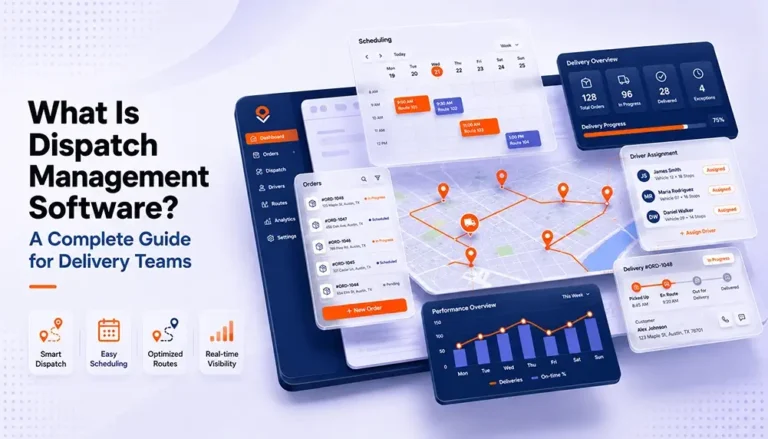
Dispatch management software is a system used to organize, assign, release, monitor, and adjust delivery or service work across drivers, vehicles, routes, and time windows.
Its job is to turn a pool of orders into executable work.
A dispatch management system typically connects several operational elements:
- Orders waiting to be scheduled or assigned
- Driver and vehicle availability
- Delivery dates and time windows
- Service areas and route groups
- Order specific requirements
- Assignment and acceptance statuses
- Changes, delays, and exceptions
- Completion information
The software gives dispatchers a shared operational view and provides structured workflows for moving work from intake to completion.
That distinction matters. A spreadsheet can store a list of orders. A map can display addresses. A messaging app can send instructions to drivers. But none of those tools, on their own, creates a controlled dispatch process.
A real dispatch process must answer four questions continuously:
- What work is ready?
- What capacity is available?
- What is the best feasible assignment right now?
- What should change when reality no longer matches the plan?
Dispatch management software brings those questions into one operating environment.
Dispatch Is a Decision Layer, Not a Digital Whiteboard
Many companies begin dispatching with a spreadsheet, a wall calendar, a shared inbox, and a dispatcher who remembers nearly everything.
That approach can work when the operation is small and predictable. The dispatcher may know every driver, every customer, every recurring route, and every difficult delivery location. Decisions can be made from experience without documenting the reasoning behind them.
The weakness appears when operational complexity grows faster than the dispatcher’s ability to hold it in their head.
A new customer introduces tighter delivery windows. The fleet begins serving multiple regions. Drivers start using different vehicle types. A 3PL adds merchants whose orders must remain separate. More orders arrive through integrations instead of phone calls. Customers expect earlier notice and more accurate delivery dates.
The issue isn’t merely that there are more orders. It is that every order now carries more variables.
At that point, dispatching stops being a list management problem and becomes a constraint management problem.
The dispatcher must balance:
- Customer commitments
- Driver availability
- Vehicle capacity
- Service duration
- Geographic coverage
- Operational priority
- Handling requirements
- Cutoff times
- Regulatory constraints
- Current route progress
For some commercial fleets, driver availability must also reflect applicable work and rest requirements. Canadian carriers, for example, may need to account for commercial driver hours of service regulations when scheduling regulated operations.
Dispatch management software doesn’t remove those constraints. It makes them easier to see, organize, and apply consistently.
The Seven Stage Dispatch Operating Model
The most useful way to understand how dispatch management software works is to follow an order through the complete dispatch cycle.
| Stage | Operational question | System responsibility | Human responsibility | Output |
|---|---|---|---|---|
| 1. Intake | What work has entered the operation? | Capture and organize order data | Resolve missing or unusual information | Validated order pool |
| 2. Qualification | Is the order ready to dispatch? | Surface dates, status, location, and requirements | Confirm feasibility and exceptions | Dispatch-ready work |
| 3. Scheduling | When should the work happen? | Organize orders by date, window, area, or capacity | Balance commitments with available resources | Scheduled workload |
| 4. Assignment | Who should perform the work? | Match orders or routes with available resources | Approve assignments and handle special cases | Assigned driver or crew |
| 5. Release | Is the plan ready for execution? | Send structured work information | Confirm readiness and timing | Active dispatch plan |
| 6. Control | What has changed during execution? | Display status changes and operational exceptions | Reassign, escalate, communicate, or reprioritize | Updated plan |
| 7. Closure | Was the work completed as intended? | Preserve completion and status information | Review failures and recurring patterns | Operational record |
The value of this model is that it separates dispatch into distinct decisions. Many inefficient operations try to perform all seven stages simultaneously.
An order is received, scheduled, assigned, changed, and communicated through the same email thread. Drivers receive partial details through text messages. Customer changes are written into spreadsheet notes. Completion information returns through photos, phone calls, or handwritten paperwork.
The operation may still finish the day, but it lacks a reliable control loop.
A dispatch management system creates that loop by keeping the order, assignment, status, and operational history connected.
Stage 1: Building a Reliable Order Pool
Dispatch quality depends heavily on the information available before an assignment is made.
An order record may need more than a customer name and destination. Depending on the operation, the dispatcher may require:
- Pickup and delivery addresses
- Contact information
- Requested delivery date
- Available delivery windows
- Item dimensions or handling requirements
- Vehicle or crew requirements
- Merchant or account ownership
- Service priority
- Access instructions
- Previous delivery attempts
- Related documents
When this information is spread across emails, spreadsheets, and customer service notes, the dispatcher spends valuable time reconstructing the order before making a decision.
That creates a hidden form of dispatch work: information recovery.
Information recovery is the time spent searching for the details required to dispatch an order safely and correctly. It includes opening old emails, calling customer service, checking whether an address was updated, confirming whether an item requires two people, or asking a driver what happened on the previous attempt.
A structured order pool reduces that search work by creating a consistent place for dispatch ready information.
For example, a scheduling workflow may allow teams to add orders manually or through an Excel upload, filter orders within an order pool, select multiple records, and view order locations on a map.
The important principle is not the specific import method. It is that orders should enter dispatch through a repeatable process rather than arriving as disconnected requests.
Stage 2: Determining Whether an Order Is Dispatch Ready
An order can exist in the system without being ready for assignment.
It may be missing a confirmed date. The customer may not have accepted the proposed window. Inventory may not be ready. The delivery address may be incomplete. The required vehicle may not be available. A previous delivery attempt may have exposed an access issue that must be resolved first.
Strong dispatch operations distinguish between:
- Orders received
- Orders validated
- Orders scheduled
- Orders assigned
- Orders released
- Orders completed
Without those distinctions, unfinished administrative work leaks into the active dispatch plan.
A driver may be assigned before the customer confirms availability. A route may be created before the item is ready. A dispatcher may assume that an address has been verified simply because the order appears in the spreadsheet.
Status discipline prevents this.
A meaningful status should tell the operation what has happened and what decision must happen next. Statuses shouldn’t merely describe where an order appears on the screen.
For example:
- Waiting for customer date selection identifies the next dependency.
- Accepted for Tuesday indicates a customer commitment.
- Assigned to Driver 14 identifies operational ownership.
- Exception: access details required identifies a blocker.
When statuses are clear, dispatchers can manage by exception rather than rereading every order.
Stage 3: Converting Customer Demand Into a Feasible Schedule
Dispatch begins before a driver receives an assignment.
The scheduling stage determines when orders can realistically enter the delivery plan. This requires balancing customer preference with operational capacity.
A customer may prefer Tuesday morning, but that preference exists alongside:
- Existing route volume
- Driver availability
- Vehicle capacity
- Service area coverage
- Warehouse readiness
- Travel requirements
- Previously accepted commitments
This is where delivery scheduling software can support a structured scheduling workflow without replacing the dispatcher’s judgment.
A good schedule is not simply a collection of requested dates. It is a set of commitments the operation has a reasonable ability to execute.
That difference becomes especially important for appointment based deliveries such as furniture, appliances, building materials, medical equipment, or other items where someone may need to be present.
When schedules are built without capacity awareness, the problem appears later as a dispatch emergency. The dispatcher is forced to solve an issue that was created when the original commitment was made.
Dispatch management therefore needs visibility into both sides of the promise:
What the customer has requested and what the operation can realistically deliver.
Stage 4: Assigning Work With Context
Assignment is often treated as the defining feature of dispatching, but clicking a driver’s name is the easy part.
The difficult part is deciding whether that assignment is operationally sound.
A dispatcher may consider:
- Is the driver working that day?
- Is the driver already committed to another route?
- Does the vehicle have enough capacity?
- Does the order require special handling?
- Is the driver familiar with the service area?
- Is a two person crew required?
- Does the customer’s window fit the planned workload?
- Will this assignment create a later capacity problem?
- Is the work better grouped with another set of deliveries?
The system can organize the relevant information and reduce repetitive work. The dispatcher still needs to judge unusual conditions, conflicting priorities, and exceptions that cannot be reduced to a simple rule.
This is why effective dispatch environments combine automation with operational control.
Automation is useful when a decision is:
- Frequent
- Repetitive
- Based on reliable data
- Governed by clear rules
- Easy to audit
Human judgment remains important when a decision is:
- Unusual
- High risk
- Based on incomplete information
- Dependent on customer relationships
- Likely to create multiple downstream trade offs
The goal is not to remove dispatchers from the process. It is to stop using their time for decisions that can be handled consistently by rules.
Stage 5: Releasing an Executable Plan
An assigned order is not necessarily ready to execute.
Before release, the driver may need:
- The correct address
- Customer contact details
- Delivery instructions
- Item information
- Time window expectations
- Supporting documents
- Sequence or route information
- Exception reporting procedures
When dispatch information is delivered through multiple channels, drivers may work from outdated instructions.
The address appears in the driver app, but the gate code was sent by text. The revised delivery window is in an email. The customer’s request for a call before arrival is stored in a spreadsheet note that the driver cannot see.
This creates two versions of the operation:
- The plan dispatch believes it released
- The plan the driver actually received
A dispatch management system should narrow that gap by connecting the active assignment to the relevant order context.
That does not mean drivers need access to every back office field. They need the information required to perform the current job and report its outcome.
Stage 6: Managing the Day When the Plan Changes
No dispatch plan survives the entire day unchanged.
Traffic slows a route. A customer becomes unavailable. A vehicle breaks down. An urgent order arrives. A delivery takes longer than expected. A driver discovers that the item cannot be safely delivered through the available entrance.
The real test of a dispatch management system is not how attractive the morning plan looks. It is how quickly the operation can understand and respond to change.
An effective control workflow follows four steps.
Detect
The operation becomes aware that actual execution no longer matches the plan.
Assess
The dispatcher determines the scope of the problem.
Is one stop affected, or will the entire route be late? Is the issue temporary? Can the work still be completed by the assigned driver?
Decide
The dispatcher chooses the appropriate response.
That may involve changing the sequence, reassigning work, contacting the customer, delaying a commitment, or escalating the exception.
Communicate
The new decision reaches the people affected by it.
This may include the driver, customer service team, warehouse, customer, account manager, or another driver receiving reassigned work.
The purpose of real time visibility is not to create a moving map for someone to watch all day. Its purpose is to expose the difference between planned execution and actual execution early enough for someone to act.
If the dispatcher learns about a failed commitment only after the customer calls, the information arrived too late to support control.
Stage 7: Closing the Operational Loop
Delivery completion is not the end of dispatch management.
The operation still needs to determine:
- Was the delivery completed?
- Was it completed inside the expected window?
- Was an exception recorded?
- Does another attempt need to be scheduled?
- Is documentation complete?
- Can the order move to billing or reconciliation?
- Did the dispatcher’s original assumptions prove correct?
This is where frontline activity affects the back office.
An incomplete delivery status may delay customer communication. Missing documentation may delay invoicing. An unrecorded failed attempt may cause the same order to be scheduled incorrectly again. A recurring access issue may remain invisible because each dispatcher handles it as an isolated event.
Closure turns activity into an operational record.
That record allows the organization to move beyond asking, “Did we finish today’s routes?”
It can begin asking:
- Which types of orders create the most dispatch intervention?
- Which service windows are difficult to meet?
- Where do assignments change most frequently?
- Which exceptions should have been identified before release?
- Which decisions could become rules?
- Which customers or locations need better order data?
Without closure, dispatch remains reactive. With closure, it becomes a source of operational intelligence.
Dispatch Management, Scheduling, Routing, and Delivery Management Are Different
These terms are related, but they should not be treated as interchangeable.
| Function | Primary question | Typical scope |
|---|---|---|
| Dispatch management | Who should perform the work, and what should change during execution? | Assignment, release, status, reassignment, and exception control |
| Delivery scheduling | When can the delivery be committed and performed? | Dates, time windows, capacity, and customer availability |
| Route planning | How should stops be grouped and sequenced? | Geography, travel time, stop order, and route structure |
| Driver management | Who is available and qualified to perform the work? | Availability, qualifications, workload, and performance |
| Delivery management | How is the entire delivery lifecycle controlled? | Scheduling, routing, dispatch, tracking, completion, and communication |
| Warehouse management | Is the inventory or shipment ready to leave the facility? | Receiving, storage, picking, packing, staging, and inventory |
The distinctions matter for software evaluation and operational design.
A route can be optimized but assigned to the wrong vehicle. An order can be scheduled for Tuesday but never assigned. A driver can receive an assignment that is geographically efficient but operationally impossible because the required item is not ready.
Dispatch management connects the plan to accountable execution.
What Information Does a Dispatch Management System Need?
Software cannot make reliable dispatch decisions from unreliable inputs.
At minimum, a dispatch management system needs accurate information about three areas.
The Work
This includes what needs to be delivered, where it needs to go, when it can be delivered, and which operational conditions apply.
The Resources
This includes available drivers, vehicles, crews, capacity, operating areas, qualifications, and active commitments.
The Current State
This includes what has already been scheduled, assigned, accepted, started, delayed, changed, completed, or failed.
The third category is often the most neglected.
Many companies have reasonably accurate order and driver data, but their current state information is scattered. A route changes, yet the spreadsheet still shows the original assignment. A driver completes an order, but dispatch does not know until the end of the day. A customer reschedules through customer service, but the dispatch board remains unchanged.
When the system’s state differs from operational reality, every later decision is made from a false starting point.
That is why timely status updates are not merely a customer experience feature. They are essential dispatch inputs.
The Human Automation Boundary
The debate around dispatch automation is often framed incorrectly.
The question is not whether dispatch should be manual or automated. Most serious operations need both.
The more useful question is:
Which decisions should be standardized, and which decisions still require judgment?
Consider three examples.
Repetitive Order Grouping
If the same service areas, delivery days, and business rules appear each week, the operation may be able to standardize how orders enter scheduling groups.
Routine Assignment
If an order has ordinary requirements and one clearly suitable driver is available, the system may assist with or automate the assignment.
High Impact Exception
If a vehicle breakdown affects several customer commitments and one priority account, a dispatcher may need to assess commercial relationships, workload, and service consequences before deciding what to reassign.
Automation should reduce low value repetition while preserving human control over ambiguous and consequential decisions.
A poor automation strategy hides rules inside a black box.
A better strategy allows the operation to understand:
- Which rule produced the recommendation
- Which data affected the decision
- When a dispatcher overrode it
- Whether the override improved the result
The most valuable dispatch knowledge often begins as dispatcher judgment. Over time, recurring decisions can be converted into documented operating rules.
The Cascading Effects of a Dispatch Decision
A dispatch decision rarely remains inside the dispatch department.
Suppose an order is assigned to a route that is already close to capacity.
The immediate effect may be a slightly longer workload. But the consequences can spread:
- The driver reaches later stops behind schedule.
- Customer arrival expectations become inaccurate.
- Customer service inquiries increase.
- The dispatcher spends more time managing exceptions.
- A delivery fails because the recipient is no longer available.
- The order returns to the facility.
- Warehouse staff must receive and stage it again.
- A second appointment must be arranged.
- Billing may be delayed or disputed.
- Management sees lower route productivity without understanding the original cause.
The initial assignment appeared to be a frontline decision. Its cost reached customer service, warehouse operations, administration, and management reporting.
The reverse is also true.
A better dispatch decision can reduce multiple forms of downstream work. That does not mean every improvement can be attributed directly to software. It means dispatch quality should be assessed by its operational consequences, not only by how quickly assignments were made.
What Good Dispatch Control Looks Like at Different Scales
There is no single dispatch structure that fits every organization.
Small Local Operation
A small courier company may have a dispatcher who also handles customer calls and driver coordination. The immediate priority is creating one reliable source of truth and reducing dependence on texts and memory.
The system should make it easy to see:
- Unassigned work
- Today’s commitments
- Driver availability
- Current delivery status
- Orders requiring attention
Growing Regional Fleet
As the company adds drivers, service areas, and accounts, dispatch specialization increases. More people may create or modify orders, making status consistency and permission control more important.
The operation needs repeatable processes for:
- Assignment
- Reassignment
- Customer changes
- Route release
- Failed delivery handling
- Shift handoffs
Multi Client 3PL
A 3PL must manage operational complexity while preserving account separation and client specific requirements.
Dispatchers may need to distinguish orders by merchant, service level, geographic area, billing arrangement, or customer communication rule.
The challenge is no longer simply moving more orders. It is moving different types of orders without collapsing them into one generic process.
High Volume Operation
At higher volume, dispatchers cannot manually inspect every ordinary order.
The system must help the team manage by exception. Standard work should move through established rules, while unusual work receives human attention.
This changes the dispatcher’s role from individually constructing every assignment to supervising the performance of the operating model.
How to Assess Your Current Dispatch Process
Before evaluating software, map how dispatch actually works today.
Do not document the ideal process described in a policy manual. Follow several real orders.
For each order, identify:
- Where the order enters the operation
- Who checks whether the information is complete
- How a delivery date is selected
- How capacity is considered
- Who assigns the driver
- How the driver receives instructions
- How changes are communicated
- How completion is confirmed
- What happens after a failed attempt
- Which information moves to billing or reporting
Then identify every point where information is:
- Re entered
- Copied between systems
- Communicated verbally
- Stored in personal notes
- Dependent on one employee’s memory
- Updated in one place but not another
- Available only after a customer complains
Those are the control gaps the software must address.
Buying a platform before understanding those gaps can digitize the existing confusion. The screens change, but the decisions remain undefined.
Implementing Dispatch Management Software Without Recreating the Old Process
Implementation should begin with operational rules, not interface configuration.
Define Dispatch Ready
Agree on the minimum information and approvals required before work can be scheduled or assigned.
Standardize Statuses
Each status should have a clear meaning, owner, and next action.
Separate Normal Work From Exceptions
Routine orders should follow a predictable flow. Exceptions should be visible without forcing dispatchers to search through the entire order pool.
Clarify Decision Ownership
Determine who can change dates, reassign drivers, release routes, cancel orders, or close exceptions.
Start With Visible Rules
Do not automate a decision until the team can explain how that decision should be made.
Preserve Override Authority
Dispatchers need a controlled way to handle unusual conditions. Overrides should be recorded so the operation can later determine whether the rule or the exception was more appropriate.
Review the Workflow After Launch
The first configuration reflects what the organization believed about its process. Actual usage will expose missing statuses, unclear ownership, and unnecessary steps.
Implementation is therefore not a one time software setup. It is the process of turning informal dispatch knowledge into a visible operating model.
Metrics That Reveal Dispatch Quality
Dispatch performance should not be judged by one metric.
A dispatcher may assign work quickly but create unstable routes. A highly stable plan may be achieved by leaving excessive unused capacity. A low failed delivery rate may hide costly manual intervention.
Useful measures include the following.
Unassigned Order Aging
How long does dispatch ready work remain without an owner?
Assignment Change Rate
How often are orders or routes reassigned after the initial decision?
A high rate may indicate volatile demand, weak planning inputs, or unrealistic initial assignments.
Dispatch Intervention Rate
How many active orders require manual dispatcher involvement?
This helps distinguish routine execution from exception heavy operations.
On Time Release Rate
Were routes or assignments released early enough for drivers and facilities to prepare?
Exception Detection Time
How long passes between an operational problem occurring and dispatch becoming aware of it?
Exception Resolution Time
Once detected, how quickly is a workable decision made and communicated?
Failed Delivery Recurrence
Are the same customers, locations, order types, or access problems creating repeated failures?
Schedule to Execution Variance
How closely did actual execution reflect the accepted plan?
No single metric proves that dispatch is effective. Together, they reveal whether the operation is controlled, stable, and capable of learning.
A Practical Example of the Dispatch Control Loop
A structured scheduling process shows how separate dispatch stages can remain connected.
Orders may enter an order pool manually or through a spreadsheet upload. Dispatch users can filter and select orders, review their locations, move selected work into a scheduler, send delivery date offers, see when customers accept, and create routes from confirmed orders.
The It’s Here appointment scheduler guide documents a workflow that separates orders not yet offered, delivery date offers, customer acceptance, and orders prepared for route planning.
The important operational idea is the sequence:
Order received → order organized → availability collected → commitment accepted → route created
Each step changes the status of the work and reduces uncertainty before execution.
That is what a dispatch control loop should do. It should not simply store orders. It should show which decisions have been made, which dependencies remain unresolved, and what needs to happen next.
Within It’s Here, the verified workflow begins with the Delivery Scheduler. Dispatch teams can organize orders in the Order Pool, search and filter records, review order locations in Map View, send delivery date offers, monitor customer acceptance, and create routes from confirmed orders.
The wider Delivery Management system adds real time shipment and driver visibility, route planning, a driver app, and digital photo and signature proof of delivery. Together, these capabilities keep scheduling, route preparation, execution visibility, and delivery completion within the same product environment.
From Reactive Dispatching to Operational Control
Reactive dispatching asks:
- Which driver can take this order?
- Why is this route late?
- Where did the delivery information go?
- Who spoke to the customer?
- Can someone fix this before the end of the day?
Operational control asks different questions:
- Which orders are likely to create intervention?
- Which commitments were made without enough capacity?
- Which exception patterns should become dispatch rules?
- Which information is repeatedly missing at intake?
- Which assignments are frequently overridden?
- What changes when volume increases?
- Which decisions depend too heavily on one dispatcher?
The first set of questions helps the team survive the current day.
The second set helps the operation design a better next day.
That is the strategic value of dispatch management. It turns daily assignments, status changes, and exceptions into a visible system that can be improved.
Conclusion
The morning dispatch problem is rarely caused by one unassigned order. It is caused by a process that cannot clearly show what is ready, what is committed, what capacity is available, who owns each decision, and what has changed.
Understanding what is dispatch management software begins with recognizing that dispatch is a continuous control process.
Orders enter the operation. Their information is validated. Commitments are scheduled. Work is assigned and released. Execution is monitored. Exceptions are resolved. Completion information returns to the business.
Software supports that cycle by making the current state visible and giving dispatchers structured ways to move work forward.
The goal is not to automate every judgment or build a perfect morning plan. It is to create an operation that can make better decisions before release, respond faster after conditions change, and learn from the difference between what was planned and what actually happened.
FAQ
What Is the Main Purpose of Dispatch Management Software?
The main purpose of dispatch management software is to organize and control the assignment and execution of delivery work. It helps teams see available orders, schedule commitments, assign drivers or vehicles, monitor status changes, and respond to exceptions.
How Is Dispatch Management Software Different From Route Optimization Software?
Dispatch management software focuses on assigning, releasing, monitoring, and adjusting work. Route optimization software primarily focuses on grouping and sequencing stops. A route can be optimized geographically but still require dispatch decisions about driver availability, vehicle suitability, customer commitments, and exceptions.
Can a Small Delivery Company Use a Manual Dispatch Process?
Yes. A small, predictable operation may be able to dispatch through spreadsheets, phone calls, and dispatcher experience. Software becomes more valuable when order volume, service areas, drivers, customer requirements, or operational exceptions make the manual process difficult to control consistently.
Does Dispatch Management Software Replace Dispatchers?
It should not replace operational judgment. It can automate repetitive tasks, organize information, standardize statuses, and recommend assignments. Dispatchers remain important for resolving unusual situations, balancing competing priorities, and making decisions when information is incomplete.
What Information Is Needed Before Implementing a Dispatch Management System?
A company should define its order requirements, scheduling rules, driver and vehicle data, dispatch statuses, assignment process, exception workflow, and completion process. Automating an unclear workflow usually transfers the same confusion into a new system.