Ask a software provider to optimize ten clean sample orders and almost every demonstration will look convincing.
A more revealing test begins after the route has been created.
Remove one driver. Change a customer time window. Add an order with special vehicle requirements. Correct an address. Ask the presenter to explain why the software produced its route and show how a dispatcher can adjust the result without rebuilding the entire plan.
That test gets closer to the real question behind how to choose route optimization software: can the product support your actual operating conditions when the data, constraints, and delivery day are not perfect?
This buyer’s checklist helps delivery businesses evaluate route planning software through workflow evidence rather than feature names, generic claims, or a polished sample map.
For the operating principles behind route creation, read our route optimization software guide.
Start With Your Routing Problem
Do not begin the selection process with a list of products. Learning how to choose route optimization software begins with defining the routing problem, operating constraints, and execution workflow the product must support.
Begin by documenting the planning problem the software must solve.
Two companies may both manage 500 deliveries per day but require very different routing workflows.
One may serve compact urban areas with narrow customer windows. Another may deliver large items across wide territories using vehicles with different capacities. A third may coordinate several clients whose orders, service rules, and completion records must remain separate.
Document the current operation in practical terms:
- How orders enter route planning
- How many routes are prepared
- How often routes change
- Which customer commitments must be protected
- Which vehicle and driver constraints apply
- Which deliveries require additional services
- Who reviews and approves routes
- How drivers receive their work
- How dispatch monitors execution
- What happens after an incomplete delivery
The right software should fit this workflow or improve it in a controlled way.
It should not require the team to create important parts of the real plan in spreadsheets, messages, or personal notes after the official route has already been built.
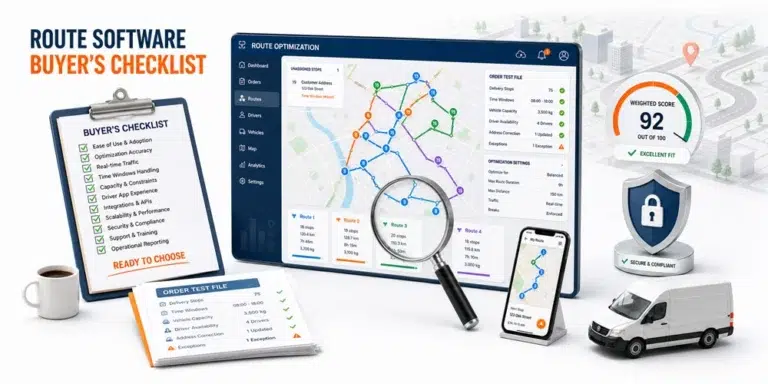
A Route Optimization Software Buyer’s Checklist
Use this checklist to create the first version of your evaluation scorecard.
| Evaluation area | What the software should demonstrate | Evidence to request |
|---|---|---|
| Order readiness | Reliable route inputs | Process an incomplete and corrected order |
| Constraint support | Rules that reflect the operation | Apply capacity, windows, priority, and service requirements |
| Route creation | Feasible route drafts | Build routes from a representative order file |
| Human control | Review and adjustment | Change a proposed route manually |
| Driver workflow | Current execution information | Show the route from the driver’s perspective |
| Active visibility | Planned versus actual progress | Demonstrate statuses, location, and ETA information |
| Exception response | Controlled operational changes | Change an active delivery scenario |
| Completion records | Retrievable evidence and history | Complete and investigate a sample order |
| Integration | Reliable movement of operational data | Map the full data flow |
| Security | Appropriate access and data protection | Review permissions and security practices |
| Reporting | Evidence for operational improvement | Reproduce a metric from source records |
| Implementation readiness | Clear ownership and adoption plan | Define data, training, testing, and support responsibilities |
A checklist should help the buying team make a decision. It should not reward a product merely for displaying the largest number of features.
A practical framework for how to choose route optimization software should give the greatest weight to essential workflows rather than optional tools shown during a demonstration.
1. Test Order Intake Before Route Optimization
A route is only as reliable as the orders used to create it.
When learning how to choose route optimization software, buyers often spend most of the demonstration reviewing the map and too little time testing order preparation.
Ask the provider to show how users can:
- Enter an individual order
- Import multiple orders
- Search and filter records
- Correct inaccurate information
- Identify missing required fields
- Review stops geographically
- Separate clients or service groups
- Preserve customer and order details
- Remove or restore an order
- Export operational records
Then introduce imperfect data.
Use one incomplete address, one duplicated order, one missing time window, and one order whose service requirements change before routing.
The goal is to understand whether the product helps users identify data problems before they become route problems.
Within It’s Here, the verified scheduling workflow includes manual order entry, Excel upload, a centralized Order Pool, search, filtering, multiple order selection, editing, exporting, map view, deletion, and order restoration.
These capabilities help dispatch teams organize the work that will later move into scheduling and route preparation.
2. Match Routing Constraints to Real Operations
A route planner should support the constraints that determine whether your deliveries can actually be completed.
Common requirements include:
- Vehicle capacity
- Customer time windows
- Driver availability
- Delivery priority
- Service duration
- Starting and ending locations
- Maximum route duration
- Vehicle or driver qualifications
- Pickup and delivery relationships
- Special handling
- Additional services
Do not accept a simple yes beside each requirement.
Ask the vendor to configure the constraint and show how it changes the route.
A useful test might include two vehicles with different capacities, one narrow delivery window, one priority order, and one delivery requiring an additional service. The system should demonstrate how those conditions affect assignment and sequence.
Also ask what happens when constraints conflict.
The software may reject the route, leave an order unassigned, propose a compromise, or require dispatcher action. The buying team needs to understand that behavior before implementation.
3. Compare Automated Planning With Dispatcher Control
Automation should accelerate repeatable planning work, but dispatchers still need an appropriate level of control.
Ask the provider to demonstrate:
- The route produced automatically
- The inputs and rules that influenced it
- A manual adjustment
- The effect of that adjustment on the rest of the route
- How the change is recorded
- What information reaches the driver
A product that generates routes quickly but makes them difficult to inspect or adjust may not fit an operation with complex customer requirements.
The delivery management software from It’s Here documents both manual and automated route optimization. It also includes multiple draft routes, allowing teams to prepare and organize different route versions before execution.
This combination supports a practical planning model: use automation to evaluate routine route combinations, then apply operational judgment where the data does not tell the complete story.
4. Evaluate the Driver Experience
The office interface is only one part of the route workflow. Any evaluation of how to choose route optimization software should include the driver experience because the approved plan must remain usable during execution.
Drivers need current, usable information without reconstructing assignments from several channels.
During the demonstration, ask to see:
- The route from the driver’s device
- The stop sequence
- Customer contact details
- Delivery instructions
- Time window information
- Additional service requirements
- Navigation handoff
- Status updates
- Failure reporting
- Photo or signature collection
Invite one or two drivers to participate in the evaluation.
A route planning system may look efficient to management but create additional steps for the people performing the deliveries.
It’s Here documents a driver app with route plan access and digital photo and signature proof of delivery. These capabilities connect the approved route with the completion evidence required by the office.
5. Test What Happens After Route Release
A perfect morning plan does not guarantee a controlled delivery day.
When deciding how to choose route optimization software, include at least one scenario that changes after the route is active.
Examples include:
- A driver becomes unavailable
- A customer changes an instruction
- A stop cannot be completed
- An urgent order is added
- A delivery takes longer than expected
- A route begins falling behind
- An address is corrected
- Another driver becomes available
Ask the presenter to show what dispatch can see and what actions are supported.
The objective is not to prove that the software can solve every exception automatically. It is to determine whether the team can understand the current situation without rebuilding it from calls, messages, and separate spreadsheets.
It’s Here documents real time shipment and driver visibility, delivery statuses, map tracking, and live ETA information. This visibility helps dispatch compare actual execution with the approved plan and recognize when intervention may be required.
6. Review Completion Records and Order History
The route workflow should create a useful record after delivery.
Ask how the system captures and retrieves:
- Completed status
- Incomplete status
- Completion time
- Driver notes
- Delivery photographs
- Digital signatures
- Bills of Lading
- Manifests
- Shipping labels
- Order history
- Previous delivery attempts
Then ask the provider to investigate a completed sample order.
The demonstration should show how customer service or operations can find what happened without contacting the driver or searching through messages.
It’s Here documents order history, photo documentation, digital signatures, Bills of Lading, manifests, and shipping labels within its delivery workflow.
These records help connect route execution with later customer inquiries and operational review.
7. Map Integrations as a Data Flow
An integration logo does not explain how operational data moves.
For each required connection, document:
- Which system creates the order
- Which fields enter route planning
- How frequently data is updated
- Which system owns the current record
- How corrections are handled
- Which statuses return to the source
- What happens when an update fails
- Who monitors the integration
- How duplicate records are prevented
- How historical data is exported
Ask the provider to trace one order through the full workflow.
The order should move from its source into route planning, receive changes, enter execution, and return completion information.
This test exposes the difference between a listed integration and a reliable operating process.
8. Include Security and Permissions in the Buying Decision
Route software may contain customer names, addresses, phone numbers, delivery history, driver information, photographs, signatures, and operational records.
Security should therefore be evaluated during selection, not after implementation.
Ask about:
- User roles and permissions
- Account creation and removal
- Multifactor authentication
- Audit records
- Data encryption
- Data retention
- Backup and recovery
- Security updates
- Incident communication
- Customer data export
- Ownership of operational data
The CISA Secure by Demand Guide recommends evaluating a software manufacturer’s security practices before procurement, including relevant requirements during procurement, and continuing the assessment after purchase.
The route planning team may not own every security decision. Include the appropriate technical or security stakeholder before the shortlist is finalized.
9. Build a Weighted Evaluation Scorecard
Not every capability has equal value. The weighted scorecard should also connect product fit with measurable operational outcomes. Our guide to route optimization ROI explains how to separate direct financial benefits, released capacity, service improvements, and implementation effort without counting the same result twice.
Use a weighting system based on operational importance.
| Score | Meaning |
|---|---|
| 0 | Not demonstrated |
| 1 | Requires substantial work outside the platform |
| 2 | Partially supports the workflow |
| 3 | Supports the basic requirement |
| 4 | Supports the requirement with appropriate control |
| 5 | Demonstrates strong fit using the test scenario |
Then assign each requirement a weight:
- Essential: The workflow cannot operate reliably without it
- Important: It materially improves control or adoption
- Conditional: It matters only for certain clients, services, or growth stages
- Optional: Useful but not connected to the primary business case
Calculate the weighted score:
Weighted Result = Requirement Score × Importance Weight
Do not allow optional capabilities to compensate for failure in an essential workflow.
A polished reporting screen should not outweigh missing support for a required delivery window, vehicle constraint, driver process, or completion record.
10. Run the Same Demo Scenario for Every Shortlisted Product
A consistent test is essential when comparing options.
Prepare a representative order file containing:
- One incomplete order
- Two customer time windows
- Two vehicle capacities
- One priority delivery
- One special service requirement
- One address correction
- One customer change
- One unavailable driver
- One incomplete delivery
- One order requiring a photo or signature
Give the same file and instructions to every shortlisted provider.
Ask each provider to demonstrate:
- Order intake
- Data correction
- Constraint configuration
- Automated route creation
- Dispatcher adjustment
- Route release
- Driver execution
- Active visibility
- Exception handling
- Completion record retrieval
This approach makes product differences easier to evaluate because each system is responding to the same operating conditions.
Questions to Answer Before Making the Decision
Before selecting a product, the buying team should be able to answer:
Workflow fit
- Can the software support our essential route workflow?
- Which steps still require another system?
- Which decisions can dispatchers review or override?
- What happens when an order cannot be routed?
Data readiness
- Are our addresses, windows, capacities, and service rules reliable?
- Which fields must be cleaned before implementation?
- Who will own route data quality?
User adoption
- Can dispatchers understand why a route was proposed?
- Can drivers use the execution workflow efficiently?
- What training and process documentation will be required?
Operational measurement
- Which baseline metrics will be captured?
- How will planned and actual results be compared?
- Can the system provide the records needed for review?
Security and ownership
- Who can access sensitive delivery information?
- How are former users removed?
- Can the business export its operational data?
- How are security updates and incidents communicated?
If important answers remain unclear after the demonstration, record them as unresolved requirements rather than assuming they will be addressed later.
Build a Shortlist Around Your Real Constraints
Understanding how to choose route optimization software requires more than comparing feature lists.
Start with the routing problem. Define the constraints that make routes feasible. Test order intake, automated planning, dispatcher control, driver execution, active visibility, completion records, integrations, permissions, and reporting.
Then require every shortlisted provider to process the same realistic scenario.
The strongest choice is the product that supports essential workflows with reliable data, clear operational control, and usable records from route preparation through completion.
A successful evaluation does not ask which system looks most impressive during a perfect demonstration. It determines which system can support the delivery operation when conditions change and the team still needs to make accountable decisions.
FAQ
How Do You Choose Route Optimization Software?
Define the routing problem, identify essential constraints, test the complete workflow with representative orders, involve dispatchers and drivers, review security, and score every shortlisted product against the same requirements.
Which Route Optimization Software Features Matter Most?
The most important features depend on the operation. Common requirements include order intake, constraint support, route creation, manual control, driver workflows, active visibility, exception handling, completion records, and integrations.
Should Dispatchers Be Able to Change Optimized Routes?
Operations with exceptions, special services, incomplete data, or local knowledge should evaluate how dispatchers can review and adjust proposed routes before and after release.
What Data Is Needed for Route Optimization?
Typical inputs include valid addresses, delivery windows, service duration, vehicle capacity, driver availability, stop priority, starting locations, and special service requirements.
How Should Route Optimization Software Be Tested?
Use a realistic order file containing incomplete data, conflicting constraints, customer changes, a driver absence, an active route exception, and a delivery requiring proof of completion.