Routing ends with a plan. Dispatch begins with operational ownership.
The routing process decides how delivery stops should be grouped and sequenced under routing constraints such as time windows, vehicle capacity, service duration, and driver availability.
Dispatch takes that proposed plan and answers a different set of questions: Is the route ready to release? Who owns it? Does the driver have the current information? What should happen when conditions change? How will completion or failure return to the office?
Dispatch routing software connects these two decision processes so the route created during planning remains usable throughout execution.
Without that connection, an optimized route can quickly separate from operational reality. The plan changes in a spreadsheet, the driver follows an older version, customer service sees another status, and completion evidence returns through messages.
This guide explains where routing ends, where dispatch begins, and how the two functions should exchange information.
For a deeper explanation of route creation, read our route optimization software guide. For the wider dispatch operating model, see our dispatch management system guide.
Routing and Dispatch Solve Different Problems
Routing and dispatch are closely related, but they are not interchangeable.
| Function | Primary question | Typical decisions | Main output |
|---|---|---|---|
| Routing | How should stops be grouped and sequenced? | Stop order, route grouping, capacity, windows, duration | Proposed route plan |
| Dispatch | Who owns the work, and what should happen during execution? | Assignment, release, status, reassignment, exception response | Controlled active work |
| Scheduling | When can the delivery be promised? | Date, time window, availability, cutoff | Confirmed commitment |
| Driver execution | How will the work be completed? | Navigation, stop actions, status, POD | Delivery outcome |
| Delivery management | How will the complete lifecycle remain connected? | Scheduling, routing, dispatch, visibility, communication, completion | End to end operational record |
Routing creates the structure of the delivery day.
Dispatch routing software makes that structure accountable by connecting the route plan with operational ownership.
A route may be geographically efficient but assigned to an unavailable driver. It may respect vehicle capacity but contain an order whose customer has not confirmed a delivery date. It may be released correctly and then become outdated when an urgent order or vehicle problem changes the plan.
That is why routing quality cannot be evaluated only before drivers leave.
The Two Control Loops
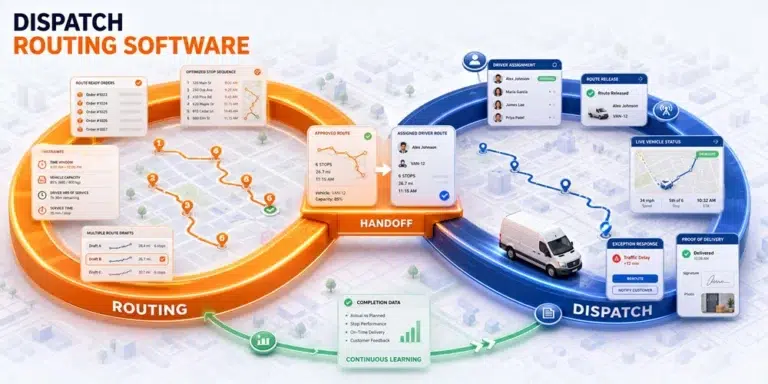
The relationship between dispatch and routing can be understood as two connected control loops.
The Planning Loop
The planning loop prepares executable work:
- Collect route ready orders
- Validate addresses and requirements
- Confirm dates or time windows
- Identify drivers and vehicles
- Apply routing constraints
- Create route drafts
- Review and approve the plan
Its output is an approved route.
The Execution Loop
The execution loop controls active work:
- Assign the approved route
- Release it to the driver
- Monitor status and progress
- Detect route exceptions
- Assess the operational impact
- Adjust, communicate, or reassign
- Record completion or failure
Its output is an operational record.
Dispatch routing software connects the output of the planning loop with the input of the execution loop. It should also return actual delivery information so future planning can improve.
The Routing to Dispatch Handoff
The handoff is the point where a proposed route becomes accountable work.
Before release, dispatch should confirm five conditions.
| Handoff condition | Routing contribution | Dispatch confirmation |
|---|---|---|
| Order readiness | Stops selected for the route | Every order is eligible for execution |
| Constraint fit | Capacity, windows, duration, and priorities applied | The route reflects current operating conditions |
| Resource fit | Driver and vehicle requirements considered | Assigned resources are available |
| Information completeness | Order details remain attached | Driver can access current instructions |
| Completion requirements | Required actions identified | Driver knows which proof or status to record |
If any condition is missing, the route may be optimized but not ready.
This distinction is particularly important when routes are prepared in advance. A route created on Monday for Thursday may need another dispatch review before release because driver availability, customer instructions, or order readiness may have changed.
1. Routing Creates the Plan Dispatch Will Control
Routing begins with a pool of eligible orders.
The system may consider:
- Delivery addresses
- Customer time windows
- Service duration
- Vehicle capacity
- Driver schedules
- Delivery priority
- Starting and ending points
- Pickup and delivery relationships
- Additional services
- Maximum route duration
The goal is to create a route that can satisfy the selected objective under those conditions.
However, optimization works with the information supplied to it.
If an address is incorrect, a customer window is outdated, or a service requirement is missing, the resulting route may still appear efficient.
Dispatch therefore needs visibility into the inputs behind the proposed plan. The team should be able to identify which orders were included, which constraints applied, and which stops could not be assigned.
2. Dispatch Adds Ownership and Release Control
A route draft does not have operational ownership until it is assigned and released.
Dispatch determines:
- Which driver will receive the route
- Which vehicle will be used
- Whether the driver and vehicle are available
- When the route should become active
- Whether instructions are complete
- Whether remaining exceptions have been resolved
- Who can change the route after release
This release decision protects drivers from receiving unfinished plans.
Without a controlled handoff, routes may be sent while dispatch is still moving orders, changing sequences, or waiting for customer confirmation. Drivers then begin work from a version that the office no longer considers current.
A clear release status should distinguish a route being prepared from one that has been approved for execution.
3. Driver Information Must Remain Connected to the Route
Drivers need more than a sequence of addresses.
Depending on the operation, they may require:
- Customer contact details
- Delivery instructions
- Time windows
- Item information
- Additional service requirements
- Access notes
- Previous attempt information
- Navigation handoff
- Required photographs or signatures
- Failure reporting procedures
When routing and dispatch use separate systems, this context may become fragmented.
The route appears in one tool, customer instructions in another, and later changes arrive through messages. The driver must determine which information is current while already performing the work.
Dispatch routing software should keep the active route and its current order details together throughout execution.
It’s Here documents a driver app with route plan access as well as photo and signature proof of delivery. This connects route execution with the completion record expected by the office.
4. Visibility Turns Route Progress Into Dispatch Information
Dispatch routing software cannot support active control using only the original route plan.
It also needs a view of what is happening now.
Relevant information may include:
- Current driver location
- Route status
- Completed stops
- Remaining stops
- Failed deliveries
- Current ETA
- Delay indicators
- Route changes
- Driver notes
The purpose of visibility is not constant observation. It is to reveal a meaningful difference between planned and actual execution.
For example, a route may show that its first four stops are complete, but the current ETA indicates that later customer windows are becoming difficult to meet.
Routing created the expected sequence. Dispatch uses the current state to decide whether intervention is necessary.
The It’s Here delivery management software documents real time shipment and driver visibility, delivery statuses, map tracking, and live ETA information.
5. Exceptions Require Both Route Context and Dispatch Judgment
An exception may begin at one stop but affect the rest of the route.
Consider a delivery that takes 35 minutes longer than expected.
Routing context helps answer:
- Which stops remain?
- Which time windows are at risk?
- How much travel remains?
- Is another route operating nearby?
- Does the vehicle still have capacity?
- Which delivery has the highest priority?
Dispatch judgment helps answer:
- Should the route continue unchanged?
- Should a customer receive an update?
- Should a stop be reassigned?
- Is another driver actually available?
- Which commitment can be adjusted?
- Who needs to know about the change?
Neither function is sufficient alone.
Route data without dispatch ownership produces information without action. Dispatch decisions without route context can solve one immediate problem while creating several later ones.
Strong dispatch route planning keeps the plan and the response process connected.
6. Route Changes Must Reach Everyone Affected
A dispatch decision is incomplete until the change reaches the relevant people and systems.
A reassigned stop may affect:
- The original driver
- The new driver
- Customer service
- The customer
- Warehouse staff
- Route progress
- ETA information
- Completion ownership
- Reporting
If only one part of the system changes, several versions of the operation begin to exist.
The dispatcher believes the stop was reassigned. The original driver still sees it. The new driver receives the address through a message. Customer service sees the initial route. The final POD is stored under the wrong assignment.
Dispatch routing software should preserve the relationship between the order, current route, assigned driver, status, and completion record when changes occur.
This does not mean every exception must be resolved automatically. It means the result of the decision should become visible and traceable.
7. Completion Data Closes Both Loops
Completion information is often treated as the end of the delivery process. It is also an input for future route and dispatch decisions.
The operation may need to record:
- Completed or incomplete status
- Delivery time
- Driver notes
- Customer signature
- Delivery photograph
- Failure reason
- Additional services performed
- Documents associated with the delivery
- Need for another attempt
It’s Here documents order history, photo and signature POD, Bills of Lading, manifests, and shipping labels.
These records allow customer service and operations to investigate what happened without reconstructing the delivery from messages.
They also help planners identify recurring patterns.
If certain locations repeatedly require more time, particular delivery types fail more often, or route estimates regularly differ from execution, the business can improve its future route inputs and dispatch rules.
What It’s Here Connects Across Routing and Dispatch
The verified It’s Here workflow includes capabilities relevant to both control loops.
Before Route Release
- Manual order entry
- Excel upload
- Centralized Order Pool
- Search and filtering
- Multiple order selection
- Map View
- Customer delivery date offers
- Offered and Accepted statuses
- Route creation from confirmed orders
- Multiple route drafts
- Manual route optimization
- Automated route optimization
During Execution
- Driver route plans
- Real time shipment and driver visibility
- Delivery statuses
- Map tracking
- Live ETA
- Customer delivery updates
After Execution
- Photo POD
- Digital signatures
- Order history
- Bills of Lading
- Manifests
- Shipping labels
The operational value comes from connecting these stages rather than treating each capability as an isolated feature.
A Routing and Dispatch Readiness Test
Before implementing dispatch routing software, test one order across the entire workflow.
Use an order with:
- A customer time window
- A vehicle requirement
- A special delivery instruction
- A required signature
- A customer change after route creation
Then verify that the system can:
- Capture the order information
- Include the order in route planning
- Apply the relevant constraints
- Assign the route
- Deliver current information to the driver
- Show active progress to dispatch
- Record the customer change
- Preserve the updated route ownership
- Capture the signature
- Retrieve the completed order history
This test reveals whether routing and dispatch are genuinely connected or only available as separate screens.
Metrics That Reveal the Quality of the Connection
Measure the handoff, not only the optimized route.
Useful metrics include:
Changes After Route Release
How often do routes require adjustment after approval?
Uncommunicated Change Incidents
How often does a driver, customer service agent, or customer work from outdated route information?
Exception Detection Time
How quickly does dispatch learn that actual execution has moved away from the plan?
Exception Resolution Time
How long does it take to make and communicate a workable decision?
Route Completion Record Rate
How consistently are required statuses, photographs, signatures, and notes captured?
Planned Versus Actual Duration
How closely does route execution match the planning assumptions?
Repeated Exception Rate
Which locations, order types, or service requirements repeatedly create routing or dispatch intervention?
These measures show whether the complete process is becoming more controlled, not merely whether the initial route looks efficient.
One Route Plan, One Dispatch Reality
Routing and dispatch are separate decision functions that depend on each other.
Routing groups and sequences delivery work under operating constraints. Dispatch assigns ownership, approves release, monitors execution, handles changes, and closes the operational record.
Dispatch routing software connects those functions so a route remains current and accountable from preparation through completion.
The goal is not to eliminate dispatcher judgment or assume that an optimized route will survive the day unchanged. It is to give routing better inputs, give dispatch better context, give drivers current instructions, and ensure that every important change returns to one shared operational record.
FAQ
What Is Dispatch Routing Software?
Dispatch routing software connects route planning with assignment, route release, driver execution, live visibility, exception response, and completion records.
What Is the Difference Between Routing and Dispatching?
Routing determines how stops should be grouped and sequenced. Dispatching determines who owns the work and what actions are needed before and during execution.
Can a Route Be Optimized but Not Ready for Dispatch?
Yes. It may still lack a confirmed driver, suitable vehicle, customer commitment, complete instructions, or required delivery information.
Does Dispatch Routing Software Automatically Reassign Deliveries?
That depends on the product and configuration. Buyers should verify whether reassignment is automated, recommended, or manually controlled. No automatic reassignment capability is attributed to It’s Here in this article.
Why Is Completion Data Important for Route Planning?
Completion times, failure reasons, driver notes, and delivery evidence can reveal where planning assumptions or dispatch rules need improvement.