Every delivery day has two versions.
The first is the route that dispatch released. The second is the operation that exists after drivers start working, customers change instructions, service times expand, and unexpected constraints appear.
Last-mile execution breaks down when the team has no reliable way to reconcile those two versions.
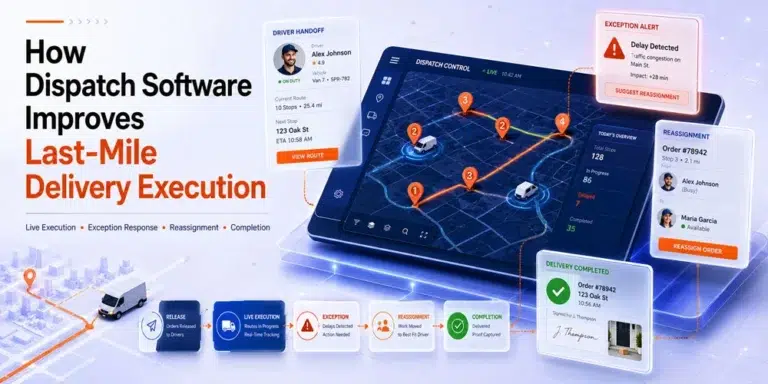
Dispatch software for last mile delivery helps maintain that connection. It keeps the active assignment, current status, driver information, delivery context, and completion record closer to the work while it is being performed.
In practical terms, dispatch software for last mile delivery gives teams a better way to manage the difference between the route that was planned and the delivery day that actually unfolds.
For a complete explanation of the wider operating model, read our guide to dispatch management software.
The Last-Mile Execution Gap
A delivery plan describes what the operation expects to happen.
Execution is what actually happens after drivers, customers, vehicles, traffic, access restrictions, service times, and unexpected changes begin interacting with that plan.
The gap between the two creates most day-of-delivery dispatch work.
A route may appear feasible when it is released but become unstable because:
- A driver starts late
- Loading takes longer than expected
- A customer is unavailable
- Delivery instructions are incomplete
- A stop requires more service time
- A vehicle becomes unavailable
- An urgent order is added
- An address or time window changes
Urban delivery also introduces constraints that are difficult to predict perfectly. Drivers may need to manage congestion, limited parking, street restrictions, cyclists, pedestrians, and building access. The U.S. Department of Transportation’s overview of urban freight challenges identifies routing, parking, and safe movement through cities as recurring issues for freight drivers.
The dispatch team’s job is therefore not finished when a route is created.
It continues until the work is completed, failed, reassigned, or returned with a clear operational record.
Before and After: A Day-of-Delivery Workflow
The difference between fragmented dispatch and connected dispatch becomes clearer when the same delivery day is viewed stage by stage.
| Execution stage | Fragmented workflow | Dispatch-controlled workflow |
|---|---|---|
| Before release | Dispatcher checks spreadsheets, messages, and printed notes | Orders, accepted dates, assignments, and instructions are reviewed in one workflow |
| Driver handoff | Driver receives route information through several channels | Driver receives the current assignment and relevant order details |
| Early execution | Dispatch waits for calls or manual updates | Status changes show which work has started and which orders need attention |
| Exception | Dispatcher reconstructs the situation before deciding | Current assignment, order details, and route progress provide decision context |
| Reassignment | Changes are communicated individually and may not reach every team | Updated ownership and instructions are recorded in the operating system |
| Completion | Photos, signatures, and notes return through separate channels | Completion status and supporting records remain connected to the order |
| End-of-day review | Managers ask individuals what happened | The operation can review changes, delays, failures, and interventions |
The improvement does not come from adding more information.
It comes from making the current version of the operation visible to everyone who needs it.
That is where dispatch software for last mile delivery becomes useful: it connects planning, driver handoff, exception response, and completion records inside one operating flow.
Execution Starts Before the Driver Leaves
Many last-mile failures are created before the first stop.
An order may reach dispatch without:
- A confirmed delivery date
- Complete access instructions
- A validated address
- The correct service requirement
- A suitable vehicle
- An assigned driver
- A clear readiness status
Once that incomplete order enters an active route, the dispatcher must resolve the missing information under time pressure.
A stronger process distinguishes between an order that exists and an order that is ready for execution.
A dispatch-ready order should have the information required to answer four questions:
- Can the delivery be performed today?
- Has the customer commitment been confirmed?
- Is the assigned resource appropriate?
- Does the driver have enough information to complete the work?
Structured delivery scheduling software can reduce uncertainty before release by organizing customer availability and accepted delivery dates.
The official It’s Here scheduler workflow, for example, documents an Order Pool with search, filtering, Map View, customer date offers, Accepted statuses, and route creation from confirmed orders. The Delivery Scheduler user guide shows how those stages remain separated rather than treating every imported order as immediately ready for dispatch.
This matters because a cleaner pre-release process gives dispatchers fewer avoidable problems to solve during execution.
The Assignment Must Include Context
Assigning a driver name to an order is not enough.
A usable assignment must include the context required to perform the work.
Depending on the delivery, that may include:
- Pickup and delivery location
- Customer contact information
- Accepted delivery window
- Access instructions
- Item or handling details
- Required additional services
- Supporting documentation
- Previous delivery attempt information
- Instructions for reporting an exception
Without that context, drivers create their own version of the plan from texts, calls, screenshots, and memory.
This increases the risk that dispatch and the driver are working from different information.
A connected driver workflow narrows that gap. The driver receives the current task, while dispatch retains visibility into the status of the assignment.
The result is a cleaner handoff between planning and execution.
Dispatch Software Creates a Shared Current State
The most important operational question during the delivery day is not:
“What was the plan this morning?”
It is:
“What is the state of the operation right now?”
A route sheet shows the original assignment. A shared dispatch system can show which work is:
- Not started
- Released
- In progress
- Delayed
- Reassigned
- Completed
- Failed
- Waiting for another action
This current-state view allows dispatchers to manage by exception.
Instead of calling every driver for an update, the dispatcher can focus on orders whose actual status no longer matches the expected state.
Real-time visibility is useful here, but only when it leads to a decision.
Watching a moving vehicle icon does not improve execution by itself. The information becomes valuable when it helps the dispatcher identify:
- A route starting later than expected
- A stop taking unusually long
- An order remaining unstarted
- A driver falling behind the expected sequence
- A delivery requiring reassignment
- A customer commitment that may be missed
The objective is not constant surveillance.
It is earlier awareness of conditions that require intervention.
Exception Handling Becomes a Controlled Process
In manual operations, an exception often begins with a phone call:
“I can’t complete this stop. What should I do?”
The dispatcher then has to reconstruct the situation.
They may need to determine:
- Which order is affected
- Why the delivery cannot continue
- What the customer was promised
- Whether another driver is nearby
- Whether the item can be returned
- Which later stops will also be affected
- Who must be informed
Dispatch software for last mile delivery shortens this reconstruction process by keeping the order, driver, status, and current assignment connected.
A practical exception workflow follows five stages.
Detect
The operation learns that the plan is at risk.
Classify
The dispatcher identifies whether the issue relates to the customer, driver, vehicle, address, item, schedule, or access conditions.
Assess the Impact
The team determines whether the issue affects one stop or the rest of the workload.
Decide
The dispatcher selects the most appropriate action: continue, delay, reassign, contact the customer, return the item, or escalate.
Record and Communicate
The updated decision becomes part of the current operating record and reaches the people affected by it.
This structure prevents each exception from becoming an improvised conversation.
Reassignment Without Losing Control
Reassignment is one of the most disruptive dispatch activities because it changes several relationships at once.
A strong dispatch software for last mile delivery workflow helps make those changes visible instead of leaving them inside calls, texts, or separate spreadsheets.
The operation must update:
- The order’s owner
- The original driver
- The new driver
- The customer commitment
- The active workload
- Any dependent stops
- The completion record
In a fragmented process, one of those updates may be missed.
The new driver may receive the address but not the handling instructions. The original route may still show the order. Customer service may continue communicating the old ETA.
A controlled reassignment should answer:
- Why is the order being moved?
- Who is now responsible?
- What information must transfer with it?
- What other commitments are affected?
- Has the change been communicated and recorded?
This is one of the clearest examples of the broader benefits of dispatch management software: a dispatch decision becomes visible beyond the person who made it.
Automation Helps With Repetition, Not Ambiguity
Some execution decisions are repeated frequently enough to be supported by rules.
Software may help identify:
- Unassigned orders
- Work approaching a time-window risk
- Drivers with available capacity
- Orders matching a service area
- Assignments that have not started
- Statuses that have remained unchanged
- Routine work eligible for reassignment
However, automated dispatching for last mile delivery should not assume that every visible option is operationally appropriate.
A driver may appear available but lack the required vehicle. A nearby route may already contain a difficult stop. A priority customer may require a response that differs from the standard rule.
This is why growing operations often use a hybrid model.
The system organizes repeatable work and surfaces relevant options. The dispatcher applies judgment where information is incomplete or consequences are significant.
Our comparison of manual vs. automated dispatching explains where that boundary should sit and when an operation is ready to automate more of the process.
Closing the Loop After Delivery
Execution does not end when the vehicle leaves the final address.
The operation still needs a clear answer to several questions:
- Was the delivery completed?
- Was it completed within the expected window?
- Was proof captured?
- Was an exception recorded?
- Does another attempt need to be scheduled?
- Can the order move to billing or reconciliation?
- Did the original assignment create avoidable problems?
The It’s Here Delivery Management platform includes a driver app with route-planning access, real-time shipment and driver visibility, live ETA information, and digital photo and signature proof of delivery.
These verified capabilities support three specific parts of execution: giving drivers access to route information, giving dispatch visibility into delivery progress, and returning completion evidence to the order record.
For example, a failed delivery should not only be marked unsuccessful. The recorded reason should help the team determine whether the failure resulted from:
- Customer unavailability
- Incorrect address information
- Access restrictions
- Insufficient service time
- Missing equipment
- Vehicle incompatibility
- A late route start
- Poor assignment decisions
Without that distinction, repeated failures continue to appear unrelated.
What Better Last-Mile Execution Looks Like
A dispatch system should not be evaluated only by how quickly routes are created.
The stronger question is whether it improves control during execution.
Useful indicators include:
Pre-Release Exception Rate
How many orders are stopped before release because required information or confirmation is missing?
A higher initial rate may be positive if it prevents incomplete orders from entering routes.
Assignment Change Rate
How often does ownership change after work has been released?
Frequent reassignment may indicate unstable planning, weak order data, or unrealistic workloads.
Exception Detection Time
How long does it take for dispatch to become aware that execution has moved away from the plan?
Exception Resolution Time
How quickly can the dispatcher make and communicate a workable decision?
Dispatcher Intervention Rate
What percentage of active orders require manual involvement?
This helps identify whether routine work is moving consistently or generating avoidable exceptions.
Completion Record Accuracy
Do completed, failed, and rescheduled orders have enough information for customer service, reporting, and billing?
These measures focus on execution quality rather than simply counting completed stops.
A Practical Last-Mile Dispatch Control Checklist
Before releasing work, confirm:
- The customer commitment is accepted
- The address and delivery instructions are complete
- The required service and equipment are known
- The driver and vehicle are appropriate
- The assignment is visible to the driver
- Exception-reporting expectations are clear
During execution, monitor:
- Work that has not started
- Orders approaching a commitment risk
- Routes with unusual delays
- Assignment changes
- Exceptions waiting for a decision
- Drivers whose workloads no longer match the plan
After execution, review:
- Failed-delivery reasons
- Repeated assignment changes
- Missing completion records
- Orders requiring another attempt
- Dispatch decisions that created downstream work
- Exceptions that could have been prevented before release
This checklist keeps last mile dispatch optimization focused on operational control rather than only on stop sequence or route distance.
Conclusion
The final mile becomes difficult when the operation cannot keep its original plan aligned with changing conditions.
Drivers encounter delays, customers update instructions, delivery times shift, and assignments that appeared reasonable in the morning may no longer be workable.
Dispatch software for last mile delivery improves execution by creating a shared current state between dispatchers, drivers, customer commitments, and completion records.
Orders reach drivers with clearer context. Dispatchers identify exceptions earlier. Reassignments remain connected to the order. Completion records return to the operation in a structured form.
The software does not remove the uncertainty of last-mile delivery. It gives the team a better way to manage that uncertainty without rebuilding the day through phone calls, spreadsheets, and disconnected messages.
FAQ
What Does Dispatch Software Do During Last-Mile Delivery?
Dispatch software helps teams release assignments, monitor order and driver statuses, identify exceptions, reassign work, and keep delivery instructions and completion records connected throughout execution.
Is Dispatch Software the Same as Route Optimization Software?
No. Route optimization focuses mainly on grouping and sequencing stops. Dispatch software focuses on assignment ownership, live execution, exception handling, reassignment, and completion status.
Can Dispatch Software Prevent Every Failed Delivery?
No. Customer absence, access restrictions, weather, traffic, vehicle issues, and incorrect order information can still cause failures. Dispatch software helps teams identify and respond to these conditions earlier.
How Does Dispatch Software Help Drivers?
It can provide drivers with current assignments, route information, delivery instructions, customer details, and a structured way to report status or completion information.
When Should a Dispatcher Reassign a Delivery?
Reassignment may be appropriate when the current driver cannot complete the delivery without putting other commitments at risk and another suitable resource can accept the work with the necessary context.