A polished software demo can make almost any warehouse platform look complete.
The presenter imports a clean order, scans a product, generates a picking list, and opens a dashboard. Every screen loads correctly because the example contains no missing data, location conflict, damaged inventory, customer change, or incomplete shipment.
Your warehouse will not operate under those conditions.
The right warehouse management system features must support routine work and reveal what happens when routine work breaks. Buyers should therefore evaluate a WMS through their actual workflow, not by counting modules on a sales page.
This guide separates essential capabilities from features that become important at scale and specialized tools that only matter in certain operating models.
The Wrong Question Is “How Many Features Does It Have?”
A long feature list may indicate broad product scope. It does not prove that the platform can support your warehouse.
Two systems can both claim to provide receiving, inventory management, picking, packing, and reporting while handling those processes very differently.
One may record a receipt without requiring location confirmation. Another may validate the product, quantity, condition, and destination before inventory becomes available.
Both systems have a receiving feature. Only one may match your control requirements.
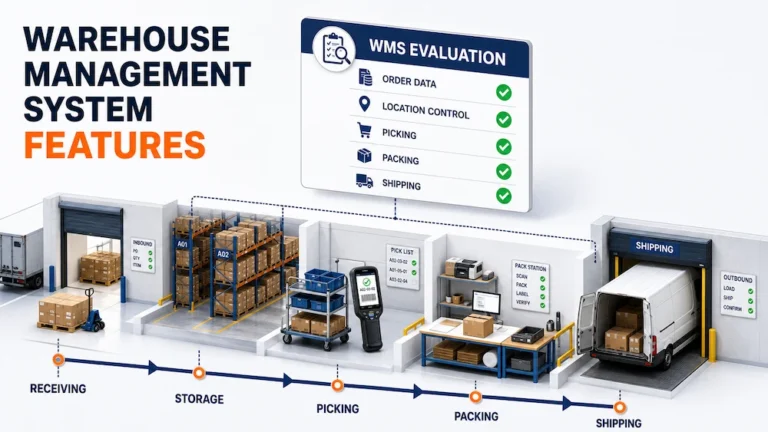
Before comparing software, document how one order should move through your operation:
- The order or receipt enters the system.
- Product and quantity information is validated.
- Inventory receives a warehouse and stock location.
- Available stock is allocated to demand.
- Employees receive picking instructions.
- Items are checked during packing.
- The shipment is completed with the required records.
- Inventory and order status reflect the completed work.
- An authorized user can investigate the transaction later.
If you need to define these stages first, use our warehouse management system guide to map the complete operating model before comparing products.
Warehouse Management System Features at a Glance
| Evaluation area | Essential capability | What the demo should prove |
|---|---|---|
| Order and product data | Complete, editable operational records | Required information remains attached to the work |
| Receiving | Expected and actual goods can be validated | Discrepancies do not disappear into available inventory |
| Stock locations | Inventory is connected to physical locations | Employees can record and verify where goods are stored |
| Inventory movements | Changes create current records | Transfers and adjustments remain traceable |
| Picking | Workers receive clear order and location context | The process identifies shortages and incorrect items |
| Packing | Packed goods can be checked against the order | Errors are found before shipment closure |
| Shipping | Completed work creates an outbound record | Inventory and order status change consistently |
| User access | Permissions reflect operational roles | Users cannot change data outside their responsibility |
| History and export | Transactions can be investigated | The business can retrieve and export its records |
| Integration | Data can move between required systems | Failed or duplicate exchanges can be identified |
The rest of the evaluation should determine how deeply the platform supports each area.
Essential Features Should Protect the Core Workflow
Essential warehouse management system features are not necessarily the most advanced. They are the capabilities required to keep ordinary warehouse work controlled.
Product and Order Records That Carry Operational Context
A product record should contain the information required to identify, store, handle, pick, pack, and ship the item.
Depending on the operation, this may include:
- SKU or product identifier
- Description
- Dimensions and weight
- Barcode or QR code
- Handling requirements
- Hazardous goods classification
- Merchant or account ownership
- Default packaging information
- Warehouse availability
The buyer should test whether this information remains connected as the product moves through the workflow.
Ask the vendor to change one important field after the order enters the system. Then verify which screens, lists, and warehouse activities reflect the change.
This is more revealing than watching a perfect product record move through a prepared demonstration.
Receiving That Separates Validation From Availability
Among essential warehouse management system features, receiving should distinguish goods that have arrived from inventory that is ready for use.
A practical receiving workflow may need to capture:
- Expected product
- Actual product
- Expected and received quantity
- Condition
- Receipt time
- Warehouse
- Temporary or final location
- Discrepancy reason
- Employee completing the transaction
The ASCM warehouse management guide describes receiving as the point where goods are inspected, scanned, and entered before putaway.
During the demo, introduce a quantity mismatch or unexpected product.
The system should make the exception visible. It should not require the employee to accept inaccurate data simply to finish the receipt.
Warehouse and Stock Location Control
A WMS should represent enough of the physical facility to guide work reliably.
For a simple warehouse, that may mean a warehouse and basic stock location. More complex operations may require zones, aisles, racks, shelves, bins, pallets, or temporary holding areas.
Evaluate whether users can:
- Create and edit warehouse locations
- Assign products to locations
- Search inventory by product or location
- Record internal movement
- Distinguish available and unavailable stock
- Review location history
- Identify inventory without a valid location
The feature becomes valuable only when physical movement updates the system state.
A graphical warehouse map may look impressive, but it is less important than the ability to record and verify the locations employees actually use.
Inventory Movement and Adjustment History
Inventory rarely remains in the first location assigned to it.
Products move because of putaway, replenishment, order picking, warehouse transfers, damage, returns, correction, or consolidation.
Strong WMS features should preserve the reason and context behind these changes.
During evaluation, move inventory between two locations and ask:
- Does the original location change immediately?
- Can another user see the current state?
- Is the movement connected to a user and time?
- Can the transaction be corrected without deleting its history?
- What happens when the destination location is invalid?
- Can the record be exported for investigation?
Broad stock planning belongs to a dedicated inventory management software workflow. The WMS should show how that inventory is physically received, stored, moved, and consumed inside the warehouse.
Picking That Guides and Verifies Work
A picking feature should do more than print a list of products.
Employees may need:
- Order priority
- Product and quantity
- Source location
- Handling instructions
- A logical collection sequence
- Confirmation that the correct item was collected
- A visible exception when inventory cannot be found
- A way to record partial completion
Ask the vendor to demonstrate an order where one required item is unavailable at the expected location.
Watch what happens next.
A strong workflow should keep the incomplete order visible and give the employee or supervisor a clear next action. It should not force the user to complete the pick inaccurately or manage the exception in a separate message.
Packing That Creates a Final Validation Point
Packing is the last practical opportunity to find many order errors before shipment.
Evaluate whether the packing workflow can:
- Display expected items
- Confirm picked quantities
- Identify missing or incorrect products
- Record packaging information
- Apply relevant documents or labels
- Prevent premature shipment completion
- Preserve who completed the work
If scanning is used, verify whether the system checks the scanned item against the current order rather than simply recording that a barcode was read.
Shipping and Operational Closure
A shipment should close the warehouse loop.
The system should update the order and inventory state, preserve relevant documents, and make the completed work available for later investigation.
The demo should show:
- What makes an order ready to ship
- Who can complete the shipment
- How inventory changes
- Which documents are generated or stored
- How a failed or cancelled shipment is handled
- Whether completed records can be reopened or corrected
- What remains visible in the order history
The objective is not merely to mark the order as shipped. It is to create a reliable closure record.
Features That Become Important as Operations Scale
Not every warehouse needs the same level of configuration. Some warehouse management system features become essential only after volume, locations, clients, or users increase.
Multiwarehouse Management
A growing network may need centralized oversight with location specific control.
Evaluate whether the platform can separate:
- Inventory by warehouse
- Orders by fulfillment location
- Users and permissions
- Warehouse transfers
- Local and network reporting
- Merchant access
- Operational history
Do not assume that adding another warehouse is simply a matter of creating another address. The system may also need to preserve ownership, availability, transfer status, and user responsibility.
Multi Merchant and 3PL Workflows
A 3PL warehouse needs stronger separation than a company managing only its own products.
Relevant capabilities may include:
- Merchant specific products
- Separate inventory and orders
- Individual merchant access
- Central operational oversight
- Merchant specific reporting
- Account based permissions
- Clear handoff to billing records
Billing should remain a connected but separate evaluation area. Do not choose a warehouse platform merely because it displays invoice terminology. Test how completed warehouse activity reaches the system that owns invoicing.
Mobile Scanning
Mobile scanning becomes more valuable when work occurs far from desktop stations.
Verify whether employees can use scanning for:
- Receiving
- Product identification
- Location confirmation
- Picking
- Packing
- Transfers
- Inventory checks
- Shipping validation
Also test what happens after an incorrect scan, repeated scan, damaged barcode, or connection problem.
The important feature is not the camera animation. It is the validation rule behind the scan and the record created afterward.
Operational Reports
Reports should answer specific management questions.
Useful examples include:
- Where is work waiting?
- Which receipt discrepancies remain unresolved?
- Which locations create repeated exceptions?
- How many orders require picking or packing?
- Which transactions were corrected?
- Who completed a warehouse activity?
- Can the result be filtered by warehouse or merchant?
A dashboard should not be considered valuable because it contains several charts. Each metric needs a clear source, definition, owner, and operational response.
Our guide to warehouse management system benefits explains how to connect these measures to operational outcomes without counting the same improvement twice.
Features That Need Operational Context
Some capabilities are highly valuable for the right warehouse and unnecessary for another.
| Feature | When it may matter | What to verify |
|---|---|---|
| Lot and expiry tracking | Food, medical, cosmetic, or regulated products | How lots enter, move, allocate, and leave inventory |
| Serial number tracking | Electronics, equipment, or warranty workflows | Whether one unit can be traced through its history |
| Hazardous goods data | Products with special storage or transport rules | Which fields, warnings, and controls are supported |
| Custom shipping packages | Irregular products or varied parcel dimensions | How packages are created and applied to shipments |
| Returns workflows | Operations receiving customer or carrier returns | How returned goods are inspected and restored or isolated |
| Sorting facility workflows | High volume hubs managing units, boxes, or pallets | Whether scan, sort, status, and outbound records stay connected |
| Ecommerce integration | Orders arriving from online stores | Which data syncs and how failures are handled |
| Carrier integration | Warehouses creating labels or shipment records | Supported carriers, documents, and exception processes |
| Automation rules | High volume repeatable decisions | Required data, override controls, and audit history |
Do not allow an advanced feature to compensate for a weak receiving, location, picking, or packing workflow.
Integration Must Include Failure Handling
A vendor may say the WMS integrates with ecommerce platforms, carriers, delivery systems, accounting tools, or an ERP.
The more important questions are:
- Which records move between systems?
- Which system owns each field?
- How often does synchronization occur?
- What happens when a required field is missing?
- How are duplicate records prevented?
- Where do failed exchanges appear?
- Can users retry a failed transaction?
- Is the integration history exportable?
When integration becomes a major project requirement, review the dedicated It’s Here integration capabilities instead of treating the WMS article as the owner of broad integration intent.
Security, Permissions, and Data Access Are Product Features
Operational software may contain merchant data, customer details, product information, inventory records, user activity, and shipment history.
The evaluation should therefore include:
- User roles
- Warehouse specific access
- Merchant separation
- Administrative permissions
- User removal
- Audit records
- Data retention
- Export capabilities
- Authentication controls
- Security update practices
- Incident communication
The CISA Software Acquisition Guide provides questions organizations can use when defining software evaluation criteria and supplier expectations.
Security should be reviewed during selection, not after the warehouse has already transferred operational data into the platform.
Verified It’s Here Warehouse Capabilities
The official It’s Here Fulfillment WMS documentation describes capabilities including:
- Multiple warehouse management
- Multi merchant separation and access
- Warehouse and stock location records
- Product records with SKU, dimensions, weight, and hazardous goods information
- Receipt and shipment orders
- Inventory search, filtering, editing, and Excel export
- Barcode and QR code scanning
- Mobile receiving and shipping workflows
- Picking and packing validation
- Warehouse transfers
- Custom shipping packages
- Ecommerce and carrier integrations
- Warehouse activity and employee efficiency reporting
These capabilities should still be tested against the operation’s own data.
A product page confirms that a feature exists. A realistic demonstration determines whether its workflow, permissions, exception handling, and records match the warehouse.
A Demo Scorecard That Exposes Weaknesses
Use one test scenario for every shortlisted platform.
Include:
- One expected receipt with a quantity difference
- One product with incomplete data
- Two warehouse locations
- One internal inventory movement
- One order containing an unavailable item
- One incorrect picking scan
- One packing correction
- One shipment requiring documentation
- Two users with different responsibilities
- One failed data exchange
- One completed order that must be investigated
Score each stage from zero to three:
| Score | Meaning |
|---|---|
| 0 | The workflow is unavailable or requires an external manual process |
| 1 | The feature exists but does not preserve the required control |
| 2 | The normal workflow works, but exception handling needs review |
| 3 | Normal work, exceptions, permissions, and records meet the requirement |
Reject any system that fails an essential workflow, even if its optional capabilities are impressive.
Choose the Workflow, Not the Longest List
The most useful warehouse management system features are the ones that protect the movement of real goods through real operating conditions.
Start with receiving, stock locations, inventory movement, picking, packing, shipping, permissions, and history. Then evaluate multiwarehouse, multi merchant, scanning, reporting, and integration capabilities according to the scale and structure of the business.
Specialized tools should be selected only when the warehouse has a documented requirement for them.
A strong evaluation does not ask whether a feature name appears on a page. It asks whether the system can guide the work, expose the exception, preserve accountability, and provide a reliable record of what happened.
FAQ
What Are the Most Important Warehouse Management System Features?
The most important features support receiving, stock locations, inventory movements, picking, packing, shipping, user permissions, transaction history, and data export. The exact requirements depend on the warehouse workflow.
Does Every Warehouse Need Barcode Scanning?
No. Some small and predictable operations may work without scanning. It becomes more valuable when product identification, location validation, order accuracy, or transaction speed is difficult to control manually.
What WMS Features Does a 3PL Need?
A 3PL may need merchant separation, individual client access, multiwarehouse support, merchant specific inventory and orders, activity history, permissions, reporting, and a controlled handoff to billing.
How Should a Company Compare WMS Features?
Use the same realistic order and exception scenario for every vendor. Evaluate the normal workflow, error handling, permissions, history, data export, integration failures, and employee experience.
Are Analytics and Automation Essential WMS Features?
Not always. Reports are useful when their definitions and operational responses are clear. Automation is valuable when decisions are repeatable and supported by reliable data. Neither should compensate for weak core warehouse workflows.