A software demo can make almost any dispatch platform look efficient.
The orders are clean, every address is valid, drivers are available, and the presenter knows exactly which button to click. The real test begins after the software enters an operation where customer dates change, order details are incomplete, and several people update the same delivery plan.
That is why evaluating dispatch scheduling software features should begin with your operating conditions not the vendor’s feature list.
The right platform must help the team move orders from intake to a confirmed schedule, prepare executable routes, keep drivers informed, and preserve a reliable record of what happened. It should also make exceptions easier to identify without claiming that every unusual decision can be automated.
For a broader explanation of the operating model behind these systems, read our complete guide to dispatch management software.
Start With the Workflow, Not the Feature Names
Two products may both advertise scheduling, automation, route planning, and tracking while supporting very different workflows.
Before comparing products, map the stages your delivery operation needs to control:
- Orders enter the dispatch environment.
- Missing or incorrect details are identified.
- Customer availability is collected.
- Delivery dates are offered and accepted.
- Confirmed orders are prepared for routes.
- Drivers receive the work.
- Dispatch monitors execution.
- Completion or failure is recorded.
A feature matters only when it strengthens one of those stages.
This is also why the best last mile dispatch software features are different for each operation. A furniture delivery company may care heavily about appointment windows, additional services, and photo proof. A local courier with flexible recipients may prioritize rapid order intake and route creation.
The checklist below separates essential capabilities from features that depend on scale or operating model.
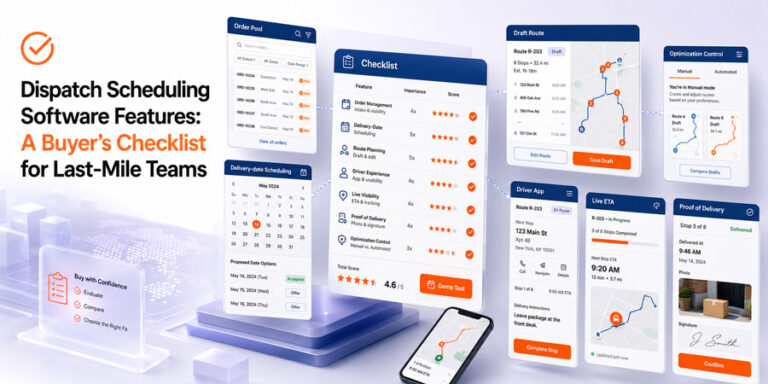
Buyer’s Checklist at a Glance
| Feature area | Priority | What it should help you control | What to test in the demo |
|---|---|---|---|
| Order intake and organization | Essential | Which work has entered dispatch | Add, edit, search, and filter real orders |
| Delivery date scheduling | Essential for appointment delivery | Which commitments have been offered and accepted | Change availability and reschedule an order |
| Status visibility | Essential | What decision has happened and what comes next | Follow one order through every status |
| Route preparation | Essential | How confirmed work moves into execution | Create a route from selected orders |
| Driver workflow | Essential for active delivery teams | What information drivers receive | Review the driver-side experience |
| Exception handling | Essential | How the operation responds to changes | Simulate one failed or delayed delivery |
| Route optimization | Scale-dependent | How stops are organized and adjusted | Compare manual and automated control |
| Real time tracking and ETA | Scale-dependent | Whether actual progress matches the plan | Follow a live or simulated route |
| Proof of delivery | Operation-dependent | How completion is documented | Capture and retrieve photo/signature proof |
| Reporting and history | Scale-dependent | What the team can learn after execution | Reconstruct a previous delivery |
| Security and permissions | Essential | Who can view or change operational data | Review user access and audit controls |
1. A Usable Order Pool
Dispatch begins with the order pool, not the route map.
The system should give dispatchers a reliable place to collect and organize work before it is scheduled. At minimum, evaluate whether users can:
- Add an individual order
- Upload multiple orders
- Search and filter records
- Review address locations
- Edit incorrect details
- Select several orders together
- Distinguish merchants or accounts when required
- Export operational data when needed
These may look like basic functions, but they determine how much time dispatchers spend cleaning and locating information.
A platform that offers sophisticated optimization but makes order correction difficult will create friction before optimization even begins.
The verified It’s Here Scheduler workflow includes manual order entry, Excel upload, merchant selection, Search, filtered Multi Select, Map View, editing, exporting, deleting, and restoring orders through its Order Pool. The Delivery Scheduler user guide documents each of these actions.
Demo test
Give the vendor a small file containing:
- One incomplete address
- Two orders for the same customer
- Multiple delivery areas
- Orders belonging to different accounts
- One record that needs correction
Then ask the presenter to import, find, update, group, and export those orders.
Do not accept a demo built only around perfect sample data.
2. Delivery Date and Availability Management
Appointment based delivery creates a specific scheduling problem: the operation needs to match customer availability with days it can actually serve.
Useful delivery scheduling software features may include:
- Configurable scheduling periods
- Available delivery days
- Unavailable dates such as holidays
- Cutoff times
- Rules for how far in advance dates are offered
- Customer date selection messages
- Clear offered and accepted statuses
- A controlled way to reschedule an order
It’s Here documents Scheduler configuration for delivery weeks, start dates, available days, unavailable dates, advance day rules, and cutoff hours. Its Scheduler can also send SMS and email notifications asking customers to select delivery dates, after which accepted orders move into an Accepted status.
This is a scheduling capability not proof that every dispatch or driver assignment decision is automated.
A dedicated delivery scheduling software workflow is most valuable when it prevents unconfirmed orders from being treated as fixed commitments.
Demo test
Ask the vendor to show what happens when:
- A customer does not respond.
- A customer accepts a date.
- The accepted date later changes.
- A holiday becomes unavailable.
- The cutoff time has already passed.
The status changes should remain understandable without opening several screens or keeping a parallel spreadsheet.
3. Statuses That Represent Real Decisions
Statuses should do more than add color to a dashboard.
Each status should answer one of these questions:
- Has the order been offered?
- Has the customer accepted?
- Has the order been assigned?
- Has the route been released?
- Is the delivery in progress?
- Was it completed or failed?
- What action is required next?
If the meaning of a status changes depending on who is using the system, dispatchers will stop trusting it.
It’s Here’s Scheduler documentation distinguishes orders that are Not Offered, Offered, Accepted, and drafted into the Delivery App after route creation. These are concrete workflow states tied to scheduling actions.
For a deeper look at how weak statuses create downstream failures, review our guide to common dispatch management mistakes.
Demo test
Ask the presenter to follow one order from intake to route creation.
At every stage, ask:
- Who changed the status?
- What action triggered the change?
- Can it be reversed?
- Who can see it?
- What should happen next?
4. A Controlled Path From Accepted Orders to Routes
Confirmed appointments must eventually become executable work.
The platform should allow dispatch teams to select the right orders, group them for a specific date or destination, create a route, and move that work into the delivery environment without re-entering the same information.
The It’s Here Scheduler documentation shows users selecting Accepted orders for a date, creating a named route, assigning it, and moving those scheduled orders into the Delivery App as drafted work.
This is an important transition because it connects customer scheduling with route preparation.
The system should preserve:
- The accepted date
- Order details
- Customer instructions
- Merchant or account ownership
- Route association
- Current status
A product that loses context during this handoff forces the dispatcher or driver to reconstruct it later.
5. Manual Control Alongside Automation
The presence of an “automate” button does not tell you how safely the feature works.
Some decisions are suitable for automation because they are repetitive and based on reliable data. Others require dispatcher judgment.
Useful controls may include:
- Automated route optimization
- Manual route adjustment
- Draft routes that can be reviewed
- The ability to accept or reject a recommendation
- Visibility into the data used
- A clear override process
It’s Here officially describes both Manual and Automated Route Optimization, along with Multiple Draft Routes. The platform allows routes to be optimized automatically or adjusted manually.
It should not be described as automatically handling every driver assignment, exception, or reassignment unless that exact workflow is separately verified.
Our manual versus automated dispatching guide explains how to decide which tasks should remain human led.
Demo test
Do not ask only, “Does the platform automate routes?”
Ask the vendor to:
- Optimize a group of stops.
- Manually move one stop.
- Save an alternative draft.
- Explain which data influenced the result.
- Show what happens when a dispatcher rejects the recommendation.
The important feature is not automation alone. It is controlled automation.
6. A Driver Experience That Matches the Office Workflow
Driver scheduling and dispatch software should not create one workflow for dispatchers and another disconnected workflow for drivers.
The driver should receive the information required to perform the assigned work, such as:
- Route plan
- Stop details
- Customer information
- Delivery instructions
- Additional service requirements
- Completion requirements
Dispatch should then be able to see whether work is progressing and retrieve the information returned by the driver.
The It’s Here Delivery Management platform documents a Driver App with route planning access, driver profiles, and photo and signature proof of delivery.
These are verified product capabilities. Features such as automated driver scoring, predictive safety alerts, or automatic reassignment should not be assumed unless demonstrated separately.
The connection between driver handoff and day of delivery control is covered in our guide to last mile delivery execution.
Demo test
Ask to see the driver interface—not screenshots of the dispatcher dashboard.
Check:
- How many steps are required to open a stop
- Where instructions appear
- How proof is captured
- What happens when delivery fails
- Whether information remains available after completion
7. Real Time Visibility That Leads to Action
Real time tracking is useful only when it helps the team make a decision.
A map full of moving vehicles may look impressive but still leave dispatchers asking:
- Which delivery is at risk?
- Which order has not started?
- What status has changed?
- What ETA can be shared?
- Which completed orders have supporting proof?
It’s Here documents real time shipment and driver visibility, live order statuses, and ETA information in its Delivery Management platform.
These capabilities help dispatch compare the plan with current execution, but they should not automatically be described as predictive delay detection or automated exception resolution.
The operational value comes from detecting a difference early enough for a dispatcher to act.
8. Proof of Delivery and Order History
Completion needs to produce a usable record.
Depending on the operation, the platform may need to capture:
- Delivery status
- Completion time
- Digital signature
- Photo evidence
- Bill of Lading
- Manifest
- Shipping label
- Failure reason
- Delivery notes
It’s Here documents downloadable digital proof of delivery with photos and signatures, as well as BOL, manifests, shipping labels, and Order History containing previous delivery details.
These records may support customer service, documentation, dispute review, and operational analysis.
The buyer should still verify which fields are mandatory, which documents are downloadable, and how long records remain accessible.
9. Customer Notifications That Match the Actual Workflow
Notification features should reflect verified events, not optimistic promises.
It’s Here documents:
- Customer date selection SMS and email
- Delivery confirmation
- Night before reminders
- Real time ETA updates
- Branded tracking links
These capabilities cover both appointment scheduling and delivery updates.
During evaluation, verify which messages are:
- Automatic
- Configurable
- Branded
- Triggered by a status
- Available through SMS, email, or a link
Also check what happens when an order is rescheduled or cancelled. An automatic message is only useful when it reflects the current operational record.
10. Security, Permissions, and Data Ownership
Dispatch systems may contain customer addresses, contact details, driver information, signatures, photos, and delivery history.
Security should therefore be evaluated during procurement, not after implementation.
Ask vendors about:
- User roles and permissions
- Account authentication
- Access removal
- Audit history
- Data export
- Backup and recovery
- Incident response
- Data retention
- Ownership of uploaded and generated records
Do not assume these capabilities exist because a platform is cloud based.
CISA’s Secure by Demand guide provides software buyers with questions for assessing whether a vendor treats security as part of the product rather than an optional customer responsibility.
No security capability should be attributed to It’s Here in this article unless it is confirmed through current technical or contractual documentation.
Features That Sound Impressive but Need Context
Some capabilities are valuable, but their usefulness depends heavily on how they are implemented.
| Feature claim | What to verify |
|---|---|
| AI powered dispatching | Which decision is automated, and can the dispatcher override it? |
| Dynamic routing | What event triggers a route change, and who approves it? |
| Predictive ETA | Which data is used, and how is accuracy measured? |
| Automatic reassignment | Which eligibility rules prevent an unsuitable assignment? |
| Real time analytics | Which actions can a dispatcher take from the dashboard? |
| Unlimited scalability | What happens to speed, support, and pricing as volume increases? |
| Seamless integration | Which systems are already supported, and what requires custom work? |
| Customizable workflows | What can the customer configure without vendor development? |
A feature should not receive a high score because its name sounds advanced.
It should receive a high score when the vendor can demonstrate how it performs under your operating conditions.
Essential, Scale Dependent, and Optional Features
Essential for Most Dispatch Teams
- Structured order intake
- Search and filtering
- Clear statuses
- Delivery date management
- Route creation
- Driver access to assignments
- Completion records
- Permission controls
More Important as Operations Grow
- Bulk order tools
- Multiple draft routes
- Manual and automated route optimization
- Real time tracking and ETA
- Order history
- Branded customer notifications
- Exportable operational records
Dependent on the Business Model
- Customer selected appointments
- Photo and signature proof
- BOL and manifest generation
- Extra service instructions
- Multi merchant separation
- Highly configurable notification workflows
A small courier operation and a multi client bulky item 3PL should not use the same weighting.
The right shortlist begins with the operational problems the software must solve. Our article on the benefits of dispatch management software can help connect each feature to a measurable outcome.
Questions to Ask During a Software Demo
Use real operational examples and ask the vendor to complete the workflow live.
Order Management
- Can we upload and correct multiple orders?
- Can we separate orders by client or merchant?
- Can we search and select orders using our actual criteria?
- Can deleted or changed records be recovered?
Scheduling
- How are available and unavailable dates configured?
- How do customers select delivery dates?
- What happens when they do not respond?
- Can accepted appointments be changed without losing history?
Route Preparation
- Can accepted orders become routes without re-entry?
- Can we create and compare draft routes?
- Can dispatchers manually adjust an optimized route?
- Which decisions are actually automated?
Driver Execution
- What information appears in the driver app?
- How are photos and signatures captured?
- How is a failed delivery recorded?
- What can dispatch see in real time?
Administration
- Which user permissions are available?
- Can we export our data?
- Which functions require vendor support?
- What training is included?
- How are product changes communicated?
A Simple Scoring Method
Score each feature from 0 to 3:
- 0 — Missing: The platform does not support the requirement.
- 1 — Workaround: The task is possible only through manual steps or another tool.
- 2 — Supported: The feature handles the normal workflow.
- 3 — Proven fit: The feature handles normal work and your tested exceptions.
Multiply each score by its operational importance:
- Essential requirement: ×3
- Important requirement: ×2
- Useful requirement: ×1
This prevents an impressive optional feature from compensating for a weak core workflow.
A platform with advanced analytics should not outrank a simpler product if it cannot reliably move an accepted delivery into an executable route.
Conclusion
The most useful dispatch scheduling software features are the ones that preserve control as an order moves from intake to scheduling, route preparation, driver execution, and completion.
A buyer should be able to see how orders enter the system, how customer dates are confirmed, how statuses change, how routes are prepared, what drivers receive, and what record remains after delivery.
It’s Here provides verified capabilities across these stages, including an Order Pool, customer date collection, route creation from accepted orders, manual and automated route optimization, real time visibility, a driver app, and digital proof of delivery.
The final buying decision should still depend on a live test using your orders, constraints, users, and exceptions. A feature list tells you what the product claims to contain. A realistic demo shows whether the workflow can support your operation.
FAQ
What Are the Most Important Dispatch Scheduling Software Features?
The most important features are structured order intake, search and filtering, delivery date management, clear statuses, route creation, driver access, execution visibility, and reliable completion records.
Is Automated Route Optimization an Essential Feature?
It becomes more valuable as route volume and complexity increase. Smaller operations may work effectively with manual planning, while growing teams often benefit from automation that can still be reviewed and adjusted.
Should Dispatch Software Include a Driver App?
A driver app is useful when drivers need access to route plans, delivery details, instructions, and proof of delivery tools. Buyers should test the driver workflow rather than evaluating only the office dashboard.
How Should Buyers Test Dispatch Software?
Use a realistic order file, include incomplete data and schedule changes, and ask the vendor to demonstrate the complete workflow from order intake through delivery completion.
Are More Features Always Better?
No. Additional features can create complexity if they do not support the operation’s actual workflow. Core capabilities should be evaluated before optional automation, analytics, or customization.