Ask a dispatcher, a customer service agent, and a recipient what “tracking” means, and you may get three different answers.
The dispatcher wants to know which driver owns the order, whether the route is progressing as expected, and where attention is needed. Customer service needs a current status and a useful ETA without calling the driver. The recipient wants a clear update that helps them prepare for arrival.
The most valuable delivery tracking software features connect those views. A moving vehicle icon is only one signal. The software must turn that signal into a reliable order status, an understandable customer update, and a delivery record the business can retrieve later.
This buyer’s checklist explains how to compare delivery tracking software features and determine what each capability needs to prove in a real last mile operation.
Start With the Decisions the System Must Support
A feature list becomes useful only after the team defines what it needs to decide.
Operations may need to answer:
- Which deliveries are active, delayed, completed, or unresolved?
- Is the displayed status based on a recent driver action or old information?
- Does the ETA still reflect current execution?
- What evidence exists after a delivery is marked complete?
- Who can view, change, or export tracking data?
The complete last mile delivery tracking guide explains how live visibility works. This checklist focuses on evaluating the capabilities that make it usable.
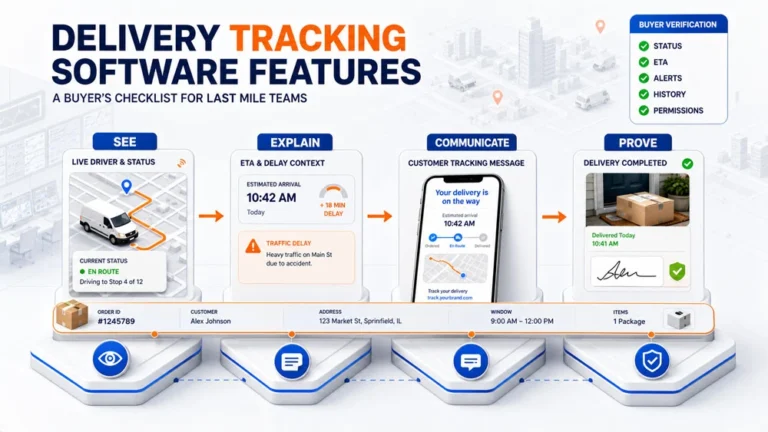
The right delivery tracking software features should support four connected outcomes:
- See: Show the current delivery state.
- Explain: Provide enough context to understand that state.
- Communicate: Share an appropriate update with the customer.
- Prove: Preserve what happened at completion.
If one part is missing, another team usually has to repair the gap manually.
How to Test Delivery Tracking Software Features
The easiest way to compare delivery tracking software features is to test whether they remain connected throughout the life of one order.
Do not evaluate tracking as an isolated map screen. Follow one order through the full chain.
| Moment in the delivery | What the system should show | Buyer test |
|---|---|---|
| Route released | Assigned driver, order details, planned sequence, and initial status | Change one instruction and confirm the current version reaches the right user |
| Driver active | Current location or progress, recent status, and relevant timing information | Ask how recent the signal is and what happens when the device stops reporting |
| Delivery at risk | A visible difference between expected and actual execution | Introduce a delay and see how dispatch recognizes it |
| Customer update | A clear status, ETA, or delivery message | Review the exact information shown to the recipient |
| Delivery completed | Completion status, time, notes, and required evidence | Retrieve the record without searching another system |
| Follow up | History available to authorized office users | Confirm who can view, change, and export the record |
This test reveals whether the platform maintains one connected delivery record.
Status Visibility Must Be Specific and Current
“In transit” can describe a delivery that left the facility five minutes ago or one that has been delayed for two hours. A useful status should help the team understand what happened and what should happen next.
Evaluate whether the system distinguishes relevant states such as:
- Assigned
- Released
- Accepted
- In progress
- Arriving
- Completed
- Failed
- Rescheduled
- Cancelled
Labels vary by operation. Each status still needs a clear trigger, owner, and meaning.
Ask the vendor to show:
- Which action creates each status
- Whether dispatch can see when the status last changed
- Whether a manual change is recorded
- How failed or incomplete work is represented
- Whether office and customer views use the same underlying event
If drivers skip status steps or the system displays stale data without context, visibility can create false confidence.
ETA Should Be Useful, Not Merely Present
An ETA is a changing estimate, not a fixed promise. Among delivery tracking software features, ETA quality is especially important because customers and office teams may make decisions based on the displayed time.
The buyer should understand what information affects it. Depending on the system, that may include current driver location, stop progress, route sequence, travel conditions, and service time assumptions.
Good evaluation questions include:
- When and how is the first ETA created?
- Does it update after a long stop or route adjustment?
- Does the customer receive a time, a window, or a general status?
- What happens when location data becomes unavailable?
Test whether the ETA stays connected to actual execution and is presented in a form customers can use.
Route planning and tracking also play different roles here. Planning establishes expected movement; tracking shows how execution is progressing against it. Our guide to delivery route management software explains that handoff in more detail.
Exception Visibility Needs an Action Path
Some platforms show data without helping the team identify what deserves attention.
Tracking software should make it practical to compare planned and actual execution. During a demonstration, introduce a realistic exception:
- A driver stops reporting location
- A delivery takes longer than expected
- A customer changes an instruction
- A stop cannot be completed
- Work is reassigned during the route
Then observe whether the system helps the team answer:
- What changed?
- Which order and customer are affected?
- Who owns the next decision?
- Does the driver or customer need an update?
- Is the change preserved in the order history?
The dispatch software for last mile delivery article covers the operational response after the issue becomes visible. This checklist should evaluate visibility and operational handoff without recreating the complete dispatch process.
Customer Communication Should Match the Order State
Customer updates should be connected to meaningful events, not sent simply because the system can send messages.
Relevant real time delivery tracking features may include:
- Delivery confirmation
- A reminder before the scheduled date
- ETA updates
- Branded alerts
- A tracking link
- Arrival notification
- Completion confirmation
Evaluate the message as carefully as the trigger.
Does the customer understand what has been confirmed? Is the ETA presented as an estimate? Does the tracking page show the correct brand and order context? Can the operation prevent an inappropriate message from being sent after a failed or rescheduled delivery?
The business value of these capabilities is explored in our article on delivery tracking software benefits. In this checklist, the buyer’s job is to verify that every customer message reflects a real event and stays aligned with the office view.
Proof of Delivery Must Complete the Tracking Record
Tracking should not end when the vehicle reaches the destination.
The system also needs a controlled way to record the result. Depending on the service, completion evidence may include:
- Delivery status and timestamp
- Driver notes
- Recipient name
- Digital signature
- Photo documentation
- Failed delivery reason
- Additional service details
The required evidence should match the service and client requirement.
Ask the vendor to complete one delivery and retrieve its evidence from the office view. Confirm that the proof remains attached to the correct order and can be found later without contacting the driver.
This is a handoff to proof of delivery, not a complete explanation of POD. A dedicated cluster article will own the definition, types, and digital workflow.
History, Search, and Export Determine Whether Data Stays Useful
Live visibility helps during the route. History helps after the route.
Customer service may investigate a complaint, operations may review repeated failures, and a client may request evidence.
Useful delivery visibility software features should make records searchable by the fields that matter to the operation, such as:
- Order or reference number
- Customer or merchant
- Driver
- Route
- Delivery date
- Current or final status
During the demo, ask for an order from several weeks earlier. Check whether users can see its status history, customer updates, delivery details, and completion evidence in one place.
Verify which fields can be exported, who can export them, and whether the data remains usable.
Permissions and Security Belong in the Feature Review
Tracking data may include customer names, addresses, phone numbers, delivery history, driver location, photos, and signatures. Access should reflect each user’s responsibility.
For that reason, permissions should be evaluated as core delivery tracking software features rather than treated as a separate administrative setting.
Ask about:
- User roles and permissions
- Merchant or client separation
- Access to driver location
- Permission to edit statuses
- Export controls
- Removal of former users
- Authentication options
- Audit records
- Data retention
- Incident communication
The CISA Secure by Demand guide recommends evaluating product security during the procurement process and continuing that assessment after purchase.
Do not accept “secure” as a complete answer. Ask the vendor to demonstrate the controls relevant to your users and data.
Test Integration Through One Real Status Change
Tracking quality depends on the information moving into and out of the platform.
Even strong delivery tracking software features become unreliable when order, status, and completion data do not move correctly between connected systems.
Instead of asking whether an integration exists, follow one event:
- An order enters from the source system.
- The order is assigned and released.
- The driver changes its status.
- The office and customer views update appropriately.
- Completion data returns to the business record.
This sequence reveals where data is delayed, copied manually, renamed, or lost.
Clarify which system owns the order ID, delivery promise, current status, and completion evidence. Connected systems can still create conflicting records when ownership is undefined.
How It’s Here Supports the Tracking Chain
It’s Here connects live visibility with the wider delivery workflow rather than treating tracking as a separate customer map.
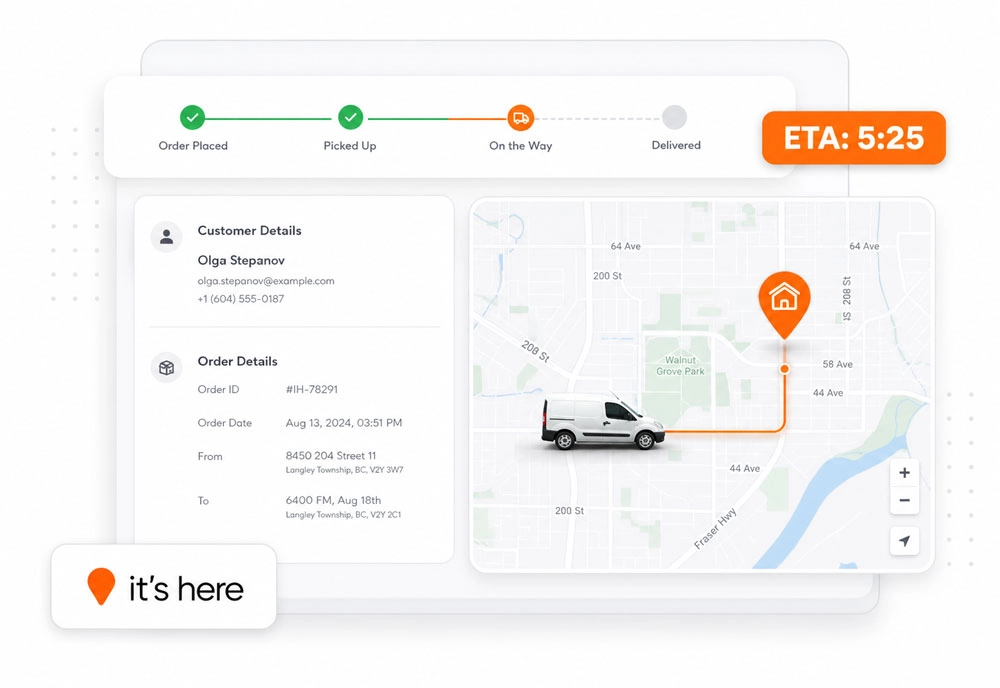
Verified capabilities on the official product page include:
- Real time shipment and driver visibility
- Shipment location and status
- ETA information
- Map live tracking
- Branded customer alerts
- Delivery confirmation
- A night before delivery reminder
- Real time ETA updates
- Branded tracking links
- Order history
- Photo and signature proof of delivery
These capabilities let buyers test the chain from active visibility through customer communication and completion records. The broader delivery management software page remains the commercial owner for the complete product, while this article owns the tracking checklist.
When reviewing delivery tracking software features in It’s Here or any other platform, use your own order states, customer messages, users, and completion requirements. A feature is valuable only when it works inside the operation that will depend on it.
Build the Shortlist Around Evidence
The strongest shortlist is not the one with the largest number of checked boxes.
It is the one that can show a reliable chain from driver activity to current status, operational response, customer communication, and delivery evidence.
Use the Tracking Chain Test with every shortlisted provider. Give each vendor the same order, delay, update, and completion requirement. Record what the system shows, what remains manual, and who can access the result.
That process turns delivery tracking software features from marketing labels into observable operating controls. It also helps the team choose a platform based on the work it must support, not the appearance of a dashboard.
FAQ
What are the most important delivery tracking software features?
The most important features are current order status, driver or shipment visibility, usable ETA information, customer alerts, branded tracking, exception context, order history, access controls, and a clear handoff to proof of delivery.
How should a company test real time delivery tracking?
Use a real order scenario. Release the route, change a delivery status, introduce a delay, review the customer update, complete the stop, and retrieve the delivery record from the office view.
Is a live map enough for delivery tracking?
No. A map shows location, but the operation also needs status context, timing information, customer communication, completion evidence, and a history that authorized users can retrieve.
Why are permissions important in tracking software?
Tracking data can contain customer details, driver location, photos, signatures, and delivery history. Permissions help limit who can view, edit, or export each type of information.
Should tracking software include proof of delivery?
The tracking workflow should connect clearly to proof of delivery so the final status and evidence remain attached to the correct order. The specific proof required depends on the delivery service and client requirements.